πŸ“¦ Multi-Warehouse Stock ERP ⚑ Barcode & QR Scanning πŸ”’ 100% Tally 2-Way Sync

Total Multi-Warehouse Stock Control & Traceability

Prevent stockouts, eliminate manual counting errors, and slash holding costs. ERPPWA unifies aisle-rack-bin location numbering, 1D/2D barcode generation, serial number lifecycles, unit-subunit conversions, and automated min-max reorders.

Schedule Guided Demo →
βœ” Zero Stockout Min-Max Automation
βœ” 100% Traceability Serial & Batch History
βœ” Fully Customized
● Multi-Warehouse Sync
⚑ Barcode & QR Ready
erppwa.com • Inventory & Warehouse Control
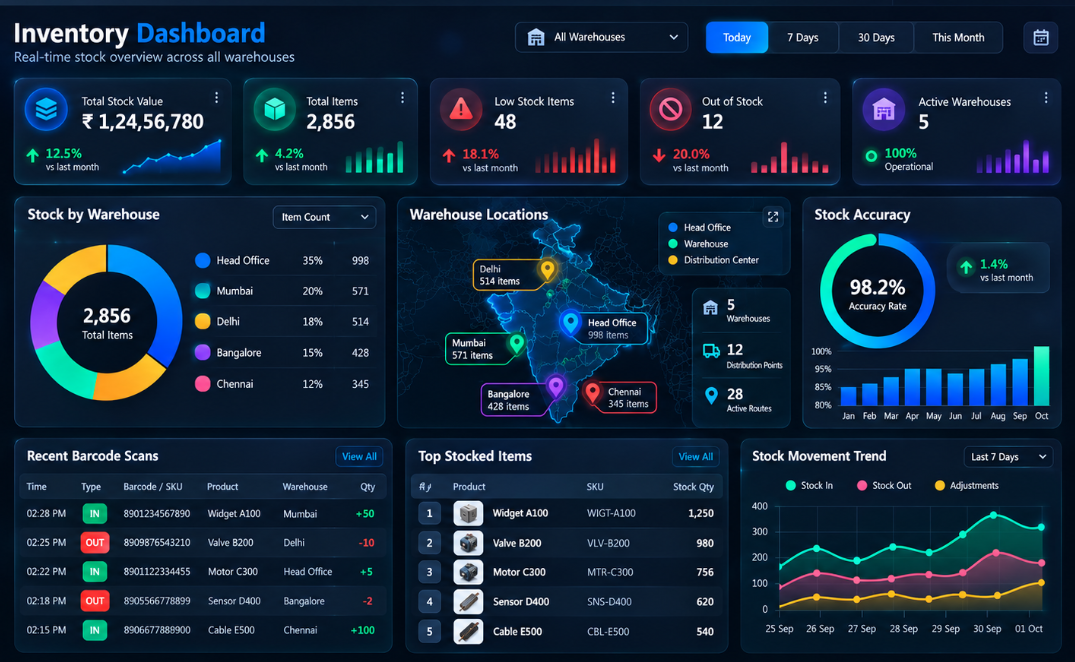
Warehouse Inventory Stock Control ERPPWA Inventory SaaS UI

Inventory & Stock Control Audio Overview

Hear how ERPPWA eliminates stockouts, automates barcode/QR picking, manages multi-warehouse bin locations, and maintains 100% stock precision.

0:00 / 2:15
Multi-Warehouse Control
1D/2D Barcode Engine
Serial Lifecycle Tracking
Unit Subunit Conversion
πŸ“– Read Briefing Summary & Transcript

Audio Summary: This briefing explains how ERPPWA Inventory Management eliminates stockouts, counting discrepancies, and dead inventory through real-time multi-warehouse bin locations, integrated barcode/QR scanning, and automated reorder triggers.

Key Topics Covered:

  • Multi-Warehouse & Bin Control: Organizing physical storage into zones, aisles, racks, and bins with instant mobile lookup.
  • Unit & Subunit Conversions: Automatically handling supplier purchase units (e.g. Boxes, Metric Tonnes) alongside internal stocking units (e.g. Pieces, KGs).
  • Barcode & QR Mobility: Generating labels upon goods receipt and scanning items during picking, transfers, and dispatches via standard smartphone cameras.
  • Serial & Batch Traceability: Tracking individual serialized parts from vendor purchase bill through production job cards to client delivery challans.
  • Reorder Buffer Management: Automated low-stock register triggers and minimum buffer alerts to prevent production shutdowns.
🏭 Connected Manufacturing Inventory Engine

Inventory Management Software for Manufacturers

Control Product Information, Multi-Warehouse Stock Movements, Material Availability, and Production Requirements in One Connected ERP

For a manufacturer, inventory is far more than a static stock count in a shed. Purchasing needs to know what is on hand before creating purchase orders. Production needs raw materials and components ready for scheduled job orders. Sales needs committed delivery visibility and customer part cross-referencing.

ERPPWA connects your entire inventory ecosystem directly into purchase orders, shop-floor production, sales dispatches, and financial ledgers — completely replacing fragmented offline spreadsheets with synchronized real-time control.

Start 20-Day Free Trial →
+40%
Stock Accuracy vs Physical Audits
-65%
Production Line Stockouts
100%
SRM Shop-Floor Traceability
1-Click
FIFO & Weighted Avg Valuation
ERPPWA :: Inventory Management & Stock Control Cockpit Live PWA Sync
ERPPWA manufacturing inventory control center dashboard displaying real-time stock balances, warehouse valuations, and automated reorder alerts.

Figure 1.1: ERPPWA Central Stock Control Center β€” live physical balances, warehouse allocations, DNI/DNO unbilled dispatches, and automated reorder notifications.

⚠️ Operational Friction Points

8 Common Inventory Challenges ERPPWA Resolves

Manufacturing facilities struggle when product masters, stock balances, shop-floor issues, and dispatches live in separate spreadsheets. Here is how ERPPWA brings order to factory operations:

πŸ“Š

1. Fragmented Stock Picture

A single stock number hides unbilled dispatches, pending vendor arrivals, and materials already reserved for active production jobs. ERPPWA's multi-column Stock Statement reveals Opening, Inward, Outward, Stock, DNI, DNO, PO Remaining, SO Remaining, and Reserves side by side.

πŸ“‘

2. Scattered Product Specifications

Drawings, HSN codes, main/sub units, reorder thresholds, and vendor prices live in isolated departmental files. The ERPPWA Product Master consolidates engineering, commercial, and inventory parameters in one searchable home.

⚑

3. Time-Consuming Variant Creation

Engineers and data entry clerks spend hours recreating similar items from scratch. With Copy This Product, clone any base item's attributes, BOM, and process routing in one click, updating only variant-specific dimensions.

🧩

4. Disconnected BOM & Material Needs

Raw material requirements live outside product masters, forcing manual estimation during order execution. ERPPWA associates structured, multi-level BOMs with scrap percentages directly to each product.

🏭

5. Untraceable Material Movements

Materials move onto the factory floor via verbal requests and scratchpads. Dedicated vouchers for Materials Issued to Production (SRM), Finished Goods In, and Stock Transfers establish an unbroken audit trail.

πŸ’΅

6. Inconsistent Costing & Pricing

Foreign currency import costs and multi-step markups lead to inaccurate selling quotes. ERPPWA's Costing Breakdown and Pricing Waterfall calculate landed costs, exchange rates, and profit margins automatically.

πŸ”

7. Unverified Inventory Quantities

Accountants and auditors cannot verify how an item reached its current balance. ERPPWA allows 1-click drilldown from any stock number directly to the supporting GRN, invoice, issue slip, or adjustment voucher.

🏒

8. Multi-Warehouse Blindspots

Stock sitting in transit or segregated across raw material sheds, WIP stages, and finished goods godowns creates artificial shortages. ERPPWA tracks location-specific bin balances with formal Transfer Inventory gate passes.

πŸ”„ Connected Flow

How ERPPWA Connects Inventory With Your Manufacturing Workflow

From initial product engineering to procurement, shop-floor issue, finished goods receipt, and dispatch audit:

Step 01 πŸ“¦

Define Your Products

Create raw materials, components, sub-assemblies, and finished products. Record technical dimensions, main/sub stock units, HSN classification, tax slabs, supplier codes, customer part mappings, and reorder levels. Attach engineering CAD drawings and spec sheets.

Step 02 βš™οΈ

Define Materials & Processes

Build multi-level Bill of Materials (BOM) with scrap percentage allowances and identify mandatory vs. optional configurations. Detail sequential manufacturing processes with target cycle times, workstations, and subcontracting stages.

Step 03 πŸ“Š

Monitor Stock & Requirements

Review the Stock Statement to evaluate live balances alongside open Purchase Orders, pending sales commitments, and reserved shop-floor materials. Low-stock alerts automatically populate the Low Stock Register to trigger timely replenishment.

Step 04 πŸ”„

Record Material Movements

Issue materials from warehouse stock to the production floor via Materials Issued to Production (SRM) vouchers tied to Job Cards. Move stock between warehouse bins with Transfer Inventory vouchers and record non-invoiced corrections with Stock Journals.

Step 05 🏭

Receive Finished Goods Into Stock

Upon job completion, generate Finished Goods In vouchers recording inspected output, batch/serial numbers, and calculated unit manufacturing costs into Finished Goods warehouses, making them instantly available for sale.

Step 06 πŸ“ˆ

Investigate, Value & Improve

Examine the Products Summary audit report, track historical product name amendments via Product Name History, verify inventory valuation in Stock Statement Beta, and review destroyed goods records to minimize factory scrap.

πŸ”— Cross-Module Synergy

Why Connected Inventory Management Matters

When inventory talks natively to purchasing, shop-floor production, sales, and accounts, your entire enterprise operates on one single source of truth:

πŸ›’

Inventory + Purchase

Reorder settings in Product Master populate the Low Stock Register. Purchase teams generate RFQs and vendor Purchase Orders directly from verified deficits, while the Stock Statement highlights POs still awaiting inward delivery.

βš™οΈ

Inventory + Production

Product BOMs drive accurate material requisition (SRM), ensuring the floor never runs dry mid-assembly. Completed job output creates Finished Goods In vouchers, calculating actual landed production costs automatically.

πŸ“ˆ

Inventory + Sales

Sales reps verify available-to-promise stock before committing delivery schedules. Customer-specific drawing numbers prevent fulfillment errors, while standard packing list items attach automatically to dispatches.

πŸ“Š

Inventory + Finance

Stock Statement Beta delivers instant monetary inventory valuations at weighted average costs. Scrap and destroyed materials reflect in proper accounting expense accounts without physical count audit shocks.

πŸš€ Risk-Free Onboarding
Experience Our Fully Customized ERP
Sign up in 30 seconds. No credit card required. Full access to all 10 core ERP modules with a 20-day free trial.
Claim Free 20-Day Trial →
πŸ“‘ Feature Deep-Dive

Comprehensive Inventory Management Features

Explore all 20 verified inventory features built into ERPPWA. From Product Master specifications, BOM mapping, foreign currency costing, and multi-warehouse bin management to SRM production issues, finished goods inwards, and multi-column stock statements.

Feature Area 01

1. Product Master β€” Central Product & Material Records

Complete Technical, Identification, and Commercial Master Data

01

The Product Master serves as the single source of truth for all materials used across your manufacturing and trading lifecycle. It supports 5 distinct product types: Raw Material, Component, Sub-Product, Master Product, and Semi-Finished Product.

Capabilities & Controls:

  • βœ“Identification & Codes: Maintain Product Name, Product Code/SKU, Product Group, Product Type, and material Composition.
  • βœ“Stock & Conversion Units: Define primary stock unit, secondary sub-units, unit conversion ratios, and separate purchasing supplier units.
  • βœ“Tax & Government Classification: Manage HSN/SAC codes, GST tax slabs, and export classification flags.
  • βœ“Reorder Thresholds & Bin Locations: Configure minimum reorder quantity, safety stock buffer, default warehouse, and physical rack/shelf/bin numbers.
  • βœ“Excel Product Import: Bulk upload new product catalogues or update existing master parameters via structured Excel sheets.
  • βœ“Copy This Product: Instantly clone an existing product to create dimensional variants, preserving BOM structure, tax slabs, and pricing rules.
🏭 Manufacturing Example: A manufacturer of stainless steel flanges produces 40 dimensional variants. Instead of typing technical specifications, HSN codes, and machining steps 40 times, the engineer sets up one base model and clicks Copy This Product, editing only nominal bore diameter and weight.
πŸ’‘ Business Benefit: Eliminate duplicate data entry, standardize naming across departments, and ensure purchasing, stores, and sales reference identical part parameters.
πŸ“Έ Product Master Interface β€” Specifications, Tax & Bin Locations
ERPPWA Product Master interface displaying technical specifications, tax classification, unit conversions, and warehouse bin locations.
Feature Area 02

2. Pricing & Valuation Settings β€” Purchase, Cost, MRP & Sale Price

Multi-Tier Commercial Controls, Foreign Currency & Pricing Waterfalls

02

ERPPWA supports comprehensive multi-tier pricing fields on every product record, eliminating guesswork when quoting customers or valuing stock.

  • βœ“Costing Breakdown: Maintain Purchase Price, Landed Cost, Cost Price, MRP, and Standard Selling Price.
  • βœ“Foreign Currency Imports: Record imported materials in USD, EUR, or GBP with automated INR conversion based on transactional exchange rates.
  • βœ“Margin vs. Markup Selector: Calculate target selling prices from cost price using user-defined margin or markup percentage rules.
  • βœ“Pricing & Costing Waterfall: Apply structured extra cost layers (inspection fee, freight allowance, packaging surcharge) on top of raw material cost.
πŸ’‘ Business Benefit: Protect commercial profit margins, calculate landed costs accurately on imported components, and automate price calculations without manual spreadsheets.
πŸ’΅ Costing Breakdown, Foreign Currency Import & Pricing Waterfall
ERPPWA inventory costing screen displaying foreign currency landed cost calculation, margin percentages, and selling price waterfall.
Feature Area 03

3. Product Detail Template Designer & Quotation Presentation

Custom Engineering Specification Sheets for Commercial Offers

03

Machinery and engineered equipment require rich, technical spec sheets attached to quotations. ERPPWA provides a visual layout designer inside the Product Master.

  • βœ“Visual Field Builder: Define formatted technical specification blocks (horsepower, input voltage, rpm, dimensions, fluid compatibility).
  • βœ“Quotation Integration: Formatted specification templates automatically populate quotation annexures during sales proposals.
  • βœ“Instant Print Preview: Review client-facing specification sheets before dispatching offers to clients.
πŸ’‘ Business Benefit: Present professional, highly detailed technical proposals without manually formatting Word documents for every bid.
πŸ“ Product Detail Template Designer & Quotation Specification Preview
ERPPWA product detail template designer configuring formatted technical specifications for manufacturing quotations.
Feature Area 04

4. Bill of Materials (BOM) Associated With a Product

Multi-Level Raw Material Mapping, Scrap Allowances & Assembly Links

04

Associate required components, sub-assemblies, and raw materials directly with finished products in the Product Master.

  • βœ“Component Breakdown: Specify child part codes, unit quantities, and required unit measurements for one finished unit.
  • βœ“Scrap Percentage Allowance: Factor in expected material loss during cutting, turning, or stamping.
  • βœ“Mandatory vs. Optional Flags: Differentiate core mechanical components from customer-selected accessories or drive modules.
  • βœ“Shop-Floor Requisition Link: BOM items feed directly into production SRM issue slips when a Work Order is launched.
🏭 Manufacturing Example: An electric panel requires 1 enclosure, 1 main MCB, 4 contactors, and 12 meters of wiring plus a 5% wire cut-off scrap factor. ERPPWA calculates total raw material requirements for a 20-panel production batch in one second.
πŸ’‘ Business Benefit: Eliminate material shortages mid-production and ensure accurate production cost roll-ups based on actual BOM consumption.
🧩 Product Bill of Materials (BOM) & Component Association
ERPPWA product Bill of Materials interface detailing component quantities, scrap factors, and assembly associations.
Feature Area 05

5. Product Process Definitions

Sequential Manufacturing Routing, Workstations & Cycle Times

05

Define the step-by-step manufacturing operations required to turn raw stock into finished goods directly inside the Product Master.

  • βœ“Sequential Routing: Define operation sequence numbers (e.g. 10: Laser Cut, 20: CNC Bend, 30: MIG Weld, 40: Powder Coat).
  • βœ“Workstation Allocation: Map each process step to specific factory machinery, work centers, or assembly bays.
  • βœ“Standard Cycle Times: Enter setup hours and runtime per unit to assist MRP capacity planning and labor costing.
πŸ’‘ Business Benefit: Standardize shop-floor operational methods, establish production benchmarks, and track work-in-progress (WIP) bottlenecks across machines.
βš™οΈ Product Process Definitions & Workstation Routing
ERPPWA product process definitions screen mapping sequential manufacturing stages, workstations, and operational cycle times.
Feature Area 06

6. Product Packing List & Included Items

Manage Standard Accessories, Fasteners and Dispatch Inclusions

06

Certain finished products include standard free accessories, mounting hardware, power cables, or test certificates that warehouse staff must pack prior to dispatch.

  • βœ“Associated Inclusions: Define standard packaging items tied to the finished SKU in the Product Master.
  • βœ“Sales Document Automation: In sales workflows, ERPPWA can automatically prompt and attach the predefined packing accessories to delivery notes.
  • βœ“Picking Checklist: Warehouse picking staff receive complete packing slips so no complementary cables or brackets are forgotten.
πŸ’‘ Business Benefit: Prevent customer complaints about missing hardware accessories and ensure packaging items are accounted for in store stock.
πŸ“¦ Product Packing List & Included Accessories Master
ERPPWA product packing list interface managing standard dispatch accessories and shipping inclusions.
Feature Area 07

7. Supplier–Product & Customer–Product Relationships

Cross-Reference External Vendor Codes and Client Part Numbers

07

Suppliers call a component by their catalogue number, while corporate buyers reference their own internal drawing code. ERPPWA bridges this gap inside the Product Master.

  • βœ“Supplier Product Mapping: Associate multiple approved vendors with their vendor part codes and contracted purchase prices.
  • βœ“Customer Part Number Mapping: Map customer drawing numbers and item codes so quotes and invoices print the client's reference automatically.
  • βœ“Search by Partner Reference: Stores and sales teams can search products using either internal SKU, supplier code, or customer part numbers.
πŸ’‘ Business Benefit: Eliminate shipping errors caused by code mismatches and make purchase orders immediately recognizable to external vendors.
🀝 Supplier and Customer Part Number Cross-Referencing
ERPPWA supplier and customer part number mapping table linking internal SKU codes to external partner references.
Feature Area 08

8. Product Document Management

Secure Engineering Drawings, 3D Models, and Quality Certificates

08

Attach technical 2D drawings (PDF), 3D CAD models, material test certificates (MTR), and RoHS/CE compliance sheets directly to the product record.

  • βœ“Direct Upload & Link Existing: Upload new files or link documents already stored in the central ERP document repository.
  • βœ“Secure Permissions: Restrict sensitive engineering drawings to authorized design and quality personnel.
  • βœ“Instant Access for QC & Stores: Receiving inspectors can pull up the verified drawing directly when inspecting inwards goods.
πŸ’‘ Business Benefit: Ensure the factory floor always works from the latest engineering drawing and eliminate outdated paper drawings from the shop floor.
πŸ“ Product Document Vault β€” Upload CAD Drawings & Certificates
ERPPWA product document management repository showing uploaded CAD drawings, technical test reports, and compliance certificates.
Feature Area 09

9. Warehouse Master & Multi-Warehouse Records

Multi-Location Godowns, Bins, and Inter-Warehouse Transfers

09

Manage physical inventory across multiple factory buildings, regional warehouses, transit godowns, and third-party jobwork processing yards.

  • βœ“Warehouse Master: Define separate stores (Raw Materials Yard, Chemical Shed, Heavy Assembly Floor, Finished Goods Godown).
  • βœ“Transfer Inventory Voucher: Move stock between locations with formal transfer gate passes and transit tracking.
  • βœ“Warehouse Filtered Reports: Filter the Stock Statement and stock valuation reports by individual warehouse or enterprise-wide aggregate.
πŸ’‘ Business Benefit: Eliminate inventory blindspots between separate factory godowns and maintain complete custody tracking during internal material transfers.
🏒 Warehouse Master & Inter-Warehouse Stock Transfer Voucher
ERPPWA inter-warehouse inventory transfer voucher moving stock between multi-location factory storage facilities.
Feature Area 10

10. Materials Issued to Production (SRM)

Store Requisition Material (SRM) Vouchers Linked to Work Orders

10

Prevent unrecorded raw material consumption by releasing materials to the factory floor only against verified Store Requisition Material (SRM) vouchers.

  • βœ“Job Card Link: Link issued materials directly to an active manufacturing job card / work order number.
  • βœ“Batch & Heat Tracking: Record specific raw material heat numbers, coil numbers, or batch codes issued to production.
  • βœ“Automatic Stock Deduction: Deducts raw materials from the main warehouse and shifts valuation into active Work-In-Progress (WIP).
🏭 Manufacturing Example: The machine shop requires 500 kg of alloy steel billets for Job #408. The storekeeper creates an SRM voucher linked to Job #408. Main store stock reduces immediately by 500 kg, and Job #408 accumulates the exact material cost.
πŸ’‘ Business Benefit: Eliminate undocumented stock shrinkage on the shop floor and calculate actual material costs per manufacturing batch.
🏭 Materials Issued to Production (SRM) Voucher
ERPPWA Materials Issued to Production voucher tracking raw materials and components released against active manufacturing job cards.
Feature Area 11

11. Finished Goods In

Record Completed Production Batches Into Finished Warehouse

11

Upon final quality clearance, completed manufacturing jobs generate a Finished Goods In inward voucher to update warehouse inventory.

  • βœ“QC Passed Inwards: Inward only verified, inspected quantities; rejected items route to scrap or rework.
  • βœ“Batch & Serial Generation: Assign manufacturing lot numbers, dates of manufacture, and individual serial codes.
  • βœ“Immediate Sales Availability: Received finished units instantly reflect in Stock Statements and sales order allocation boards.
πŸ’‘ Business Benefit: Close the loop between production and sales dispatches without manual ledger entries or phone calls to warehouse managers.
πŸ“₯ Finished Goods Inward Receipt Voucher
ERPPWA Finished Goods In voucher recording completed manufacturing batches into warehouse stock with inspection status.
Feature Area 12

12. Destroyed Goods / Inventory Write-Off Records

Formal Scrap Vouchers, Reason Classifications & Audit Logs

12

Damaged raw materials, expired chemical compounds, or machining rejects cannot simply vanish from the warehouse without formal explanation.

  • βœ“Categorized Reason Codes: Classify write-offs by reason (machining flaw, handling transit damage, chemical expiry, obsolete engineering rev).
  • βœ“Management Approval: Require supervisor sign-off before inventory valuation is written down.
  • βœ“Scrap Analytics: Review monthly scrap volume reports to identify recurring process quality issues.
πŸ’‘ Business Benefit: Eliminate mysterious stock variances during annual physical audits and capture actionable quality failure metrics.
πŸ—‘οΈ Destroyed Goods & Scrap Write-Off Voucher
ERPPWA destroyed goods and scrap inventory record documenting write-offs with reason codes and approval audit logs.
Feature Area 13

13. Stock Journal In & Stock Journal Out β€” Permanent Adjustments

Auditable Non-Invoiced Physical Count Adjustments

13

Maintain accurate physical stock counts without tampering with commercial purchase orders or customer sales invoices.

  • βœ“Stock Journal In: Account for surplus found during physical stock audits or initial ERP opening balance uploads.
  • βœ“Stock Journal Out: Account for non-invoiced stock reductions such as customer marketing samples, R&D lab tests, or internal maintenance use.
  • βœ“Mandatory Audit Remarks: Every adjustment requires descriptive accounting notes, preventing untraceable edits.
πŸ’‘ Business Benefit: Reconcile physical inventory counts smoothly without violating statutory tax invoices or creating accounting discrepancies.
πŸ“ Stock Journal In & Stock Journal Out Adjustments
ERPPWA Stock Journal interface processing permanent non-invoiced inventory corrections with detailed accounting remarks.
Feature Area 14

14. Stock Statement Report β€” Inventory Position & Pending Requirements

The Ultimate Multi-Column Manufacturing Stock Intelligence Report

14

Conventional ERPs show only a bare 'Closing Stock' number. ERPPWA provides a comprehensive, multi-dimensional view of your actual inventory position:

Column Operational Significance for Manufacturers
Opening Stock balance carried forward from the previous financial year.
Inward Total material received via Purchase Invoices and inward vouchers.
Outward Total material issued or sold via Sales Invoices and outward vouchers.
Stock Physical on-hand quantity currently resting in warehouse racks.
DNI (Delivery Note In) Material physically received from suppliers but awaiting purchase bill entry.
DNO (Delivery Note Out) Material physically dispatched to customers before sales tax invoice generation.
PO Remaining Quantity confirmed on approved vendor Purchase Orders not yet received.
SO Remaining Committed sales order quantities waiting for production or dispatch.
Reserve Material locked on the factory floor for active Job Cards.
Order / Excess Net calculated requirement indicating true purchase deficit or surplus inventory.
πŸ’‘ Business Benefit: Make 100% data-driven procurement and production scheduling decisions with zero hidden surprises.
πŸ“Š Comprehensive Multi-Column Stock Statement Report
ERPPWA comprehensive Stock Statement report showing complete physical inventory, unbilled dispatches, pending commitments, and net reorder requirements.
Feature Area 15

15. Stock Statement Beta β€” Quantity & Inventory Valuation View

Monetary Stock Valuation at Weighted Average Rates

15

Finance directors and business owners need to know the exact rupee value of stock tied up in raw materials, WIP, and finished inventory.

  • βœ“Weighted Average Pricing: Automatically calculates average purchase rates (e.g., 100 units bought at β‚Ή100 and 100 units at β‚Ή120 yields a β‚Ή110 weighted rate).
  • βœ“Rupee Valuation Column: Displays calculated total inventory value per line item and aggregate warehouse balance.
  • βœ“1-Click Excel Export: Download comprehensive valuation statements for bank loan stock inspections and balance sheet audits.
πŸ’‘ Business Benefit: Generate instant, certified inventory valuation figures for working capital financing and audit compliance in 30 seconds.
πŸ“ˆ Stock Statement Beta β€” Quantity & Monetary Inventory Valuation
ERPPWA inventory valuation report displaying live stock quantities, weighted average unit costs, and total warehouse asset values.
Feature Area 16

16. Products Summary Report

Complete Master Data, Prices & Inventory Parameters in One Panoramic View

16

Audit your complete product database across hundreds of attributes in a single wide reporting interface with search, column filters, and export tools.

  • βœ“Unified Parameters: Inspect item codes, groups, categories, HSN, purchase prices, MRP, selling rates, and rack locations together.
  • βœ“Catalogue Health Check: Identify items missing HSN codes, tax slabs, or reorder levels before they disrupt sales or procurement.
πŸ’‘ Business Benefit: Give management full audit visibility over large product catalogues containing thousands of SKUs.
πŸ“‹ Products Summary Master Report
ERPPWA products summary catalogue audit report and historical product name modification tracking log.
Feature Area 17

17. Product Name History Report

Immutable Audit Trail of Product Renaming & Modifications

17

When a product name is corrected or revised, historical invoices, POs, and job cards must remain auditable without confusion.

  • βœ“Chronological Change Log: Records previous product name, new name, user ID, and exact timestamp.
  • βœ“Audit Integrity: Historic vouchers retain their original recorded names while the master updates for future transactions.
πŸ’‘ Business Benefit: Eliminate disputes where vendors or customers claim they were invoiced for a different product code.
Feature Area 18

18. Additional Verified Inventory Capabilities

High-Value Productivity Tools for Growing Factory Operations

18

πŸ“± Product QR Code Invoice Scanner

Scanning an ERPPWA product QR code during invoice creation adds that product immediately to the line items without manual typing.

🏷️ Serial Number Tracking

Maintain discrete serial numbers for high-value items, track warranty history, and follow serial numbers from production through customer invoice.

πŸ”€ Merge Duplicate Products

Merge two accidentally created duplicate items into one master record, consolidating transaction history seamlessly.

🏷️ Brand-Wide Price Changes

Update purchase prices across all products under a specific brand or supplier in one batch action when a vendor revises their price list.

Feature Area 19

19. Connected Inventory Workflows Across ERPPWA

Seamless Material Handshakes Between All 10 Core Modules

19

Every material transaction in ERPPWA triggers corresponding movements across supply chain, production, and accounting ledgers:

1. Procurement to Stock: Low Stock Register → RFQ → Purchase Order → Delivery Note In (DNI) / GRN → Warehouse Stock + Accounts Payable
2. Stock to Production: Approved Job Card → Store Requisition Material (SRM) → Raw Material Stock Deducted → Active WIP Valuation
3. Production to Finished Goods: Job Completion → Finished Goods In Voucher → Finished Goods Stock → Ready for Sales Allocation
4. Stock to Customer Dispatch: Sales Order → Delivery Note Out (DNO) → Warehouse Stock Deducted → GST Tax Invoice + E-Way Bill
Feature Area 20

20. Inventory Reports and Vouchers at a Glance

Summary of All Core Operational Documents & Reports

20
Voucher / Report Primary Function & Purpose
Materials Issued to Production (SRM) Issues raw materials and components from warehouse to a specific shop-floor job card.
Finished Goods In Receives completed, inspected production units from manufacturing into finished goods warehouse.
Transfer Inventory Transfers stock between multiple warehouses, godowns, or transit bins with gate passes.
Destroyed Goods Documents scrap, transit breakage, and damaged inventory write-offs with audit justifications.
Stock Journal In / Out Processes permanent non-invoiced stock adjustments for physical count audit reconciliations.
Stock Statement Report Displays multi-column stock balances, unbilled DNI/DNO, PO/SO commitments, and net reorder deficits.
Stock Statement Beta Provides monetary valuation of inventory based on weighted average purchase pricing.
Products Summary Wide catalogue audit table for monitoring master data, taxation, units, and rack locations.
Product Name History Chronological audit log tracking historical product name amendments, users, and timestamps.
πŸš€ Risk-Free Onboarding
Experience Our Fully Customized ERP
Sign up in 30 seconds. No credit card required. Full access to all 10 core ERP modules with a 20-day free trial.

Claim Free 20-Day Trial →
⚑ 6-Step Inward-to-Dispatch Inventory Workflow

The Complete Modern Warehouse Lifecycle

Eliminate lost stock and inventory discrepancies. ERPPWA links your vendor receipts, bin put-away, barcode generation, serial tracking, production issues, and dispatch slips into one synchronized pipeline.

1

Delivery In (GRN) & PO Match

Verify inbound deliveries against vendor Purchase Orders. Auto-convert supplier billing units (e.g. Tonnes/KGs) into internal stock units with automated tolerance checks.

2

Barcode/QR Print & Bin Put-Away

Auto-generate 1D Barcodes and 2D QR stickers. Assign goods to designated warehouse zones, aisles, racks, and bin locations for instant picker navigation.

3

Serial Lifecycle & Quality QA

Assign unique serial numbers to finished machines and sensitive components. Log QC inspection parameters, test certificates, and warranty parameters.

4

Production Issue (BOM & WIP)

Issue raw materials directly to shop-floor manufacturing against Work Orders in 1 click. Move items to WIP and deduct stock automatically with mathematical precision.

5

Stock Transfer & Reconciliation

Transfer inventory across branch warehouses with in-transit tracking. Record damaged goods scrap and Stock Journals for 100% audited book balance.

6

Delivery Out & Invoicing

Pick and scan items via mobile barcode readers for dispatch. Generate Delivery Outward Challans, pack slips, and convert to GST Tax Invoices in 1 click.

⚑ Operational Capabilities

End-to-End Inventory Management Features

Explore how ERPPWA eliminates stock leaks, solves multi-unit conversion chaos, and streamlines multi-warehouse distribution.

🏒 Multi-Warehouse Control πŸ“ Aisle-Rack-Bin System 🚚 Inter-Godown Transfers

Multi-Warehouse Control & Bin Location Numbering

⚠️ The Operational Challenge

Stock scattered across central warehouses, regional godowns, and shop floors causes phantom stockouts. Pickers wander warehouse aisles aimlessly searching for items, and inventory transferred between locations vanishes into transit black holes.

✨ The ERPPWA Solution

Centralize multi-warehouse operations with pinpoint bin-level visibility. Organize every warehouse into structured Zones, Aisles, Racks, and Bins with a standardized Location Numbering System. Execute seamless Stock Transfers between locations with dedicated dispatch and receipt reconciliation.

  • βœ“Multi-warehouse live balance tracking across unlimited godowns
  • βœ“Aisle-Rack-Shelf-Bin location numbering system per SKU
  • βœ“Inter-warehouse stock transfer notes with in-transit reconciliation
  • βœ“Fast item lookup showing exact quantity and physical bin location
  • βœ“Warehouse-wise reorder triggers to prevent regional stock exhaustion
  • βœ“User access permissions restricted by warehouse and branch territory

Cut order picking times by up to 60% with instant digital bin navigation.

Schedule Guided Demo →
Warehouse Stock & Bins • Live UI
🏒 Multi-Warehouse Stock & Bin Matrix
● 4 WAREHOUSES LIVE
12,480
Total Stock Units
β‚Ή 1.84 Cr
Total Valuation
99.8%
Bin Pick Accuracy
Product / SKU Warehouse Location Bin Location Code Available Qty
Hydraulic Valve 80mm
SKU-HYD-80
Plant 1 • Central Godown Aisle-B • R-04 • B-12 320 Pcs
SS316 Precision Flange
SKU-FLG-SS316
Plant 2 • Forging Store Aisle-A • R-01 • B-05 1,450 Pcs
Alloy Steel Dowel Pins
SKU-PIN-EN31
Transit: Plant 1 → Plant 2 In-Transit (TRF-104) 500 Pcs
⚑ Instant Transfer Trigger 1-Click Inter-Warehouse Transfer with QR Delivery Gate-Pass
⚑ 1D & 2D QR Code Generator πŸ–¨οΈ Thermal Label Printing πŸ“± Mobile Camera Scan

Barcode & QR Code Generation, Print & Mobile Scan

⚠️ The Operational Challenge

Manual clerical entry at goods inward and dispatch packing leads to severe human errorsβ€”wrong SKU dispatches, misplaced batches, and slow stock counting. Expensive proprietary handheld terminals require dedicated IT configurations.

✨ The ERPPWA Solution

Transform your warehouse into a paperless, barcode-driven hub. ERPPWA includes native 1D Barcode and 2D QR Code generation. Print standardized label stickers directly on thermal printers, and scan barcodes using any mobile phone camera or standard wireless USB scanner.

  • βœ“Native Barcode (Code-128, EAN-13) & 2D QR Code generation
  • βœ“Direct printing to standard thermal label and barcode printers
  • βœ“Instant mobile camera barcode scanning via progressive web app
  • βœ“Scan-to-Verify packing during Delivery Outward dispatch
  • βœ“Rapid physical stocktaking: scan bin QR codes to reconcile counts
  • βœ“Customizable label layout: SKU, Part No, Batch, Exp Date & MRP

Eliminate shipping errors and accelerate inward receiving by up to 80%.

Schedule Guided Demo →
Barcode & QR Center • Live UI
⚑ Barcode & QR Label Engine
● SCAN ENGINE READY
πŸ“· Scanner Mode: Active (Mobile Camera / USB Gun)
Scanned Item / SKU Barcode / QR Value Batch / Serial No Scan Verification
Flange SS316 4-Inch |||| ||| ||||||| 890124 BATCH-2026-B8 βœ“ VERIFIED • INWARD
Hydraulic Cylinder 80mm QR: HYD80-SN99142 SN-2026-099142 βœ“ PICKED FOR DISPATCH
En31 Ground Dowel Pins |||| ||| ||||||| 890128 BATCH-2026-B9 BIN VERIFIED: B-05
0.3s
Barcode Scan Decode Time
Zero Errors
Dispatch Packing Accuracy
βš–οΈ Main Unit & Subunits πŸ”„ Supplier Unit Conversion πŸ“ Fractional Decimals

Unit, Subunit & Supplier Unit Conversion Matrix

⚠️ The Operational Challenge

Suppliers invoice raw materials in Tonnes, KGs, or Rolls, but production consumes them in Meters, Grams, or Pieces. Trying to manually calculate conversion ratios in spreadsheets corrupts physical stock ledgers, inflates unit costs, and causes financial accounting havoc.

✨ The ERPPWA Solution

Master multi-unit complexities with automated conversion factors. ERPPWA supports Main Units, Subunits, and dedicated Supplier Units per item. When an inward purchase voucher is created in the supplier's billing unit, the system auto-converts and stocks the material in your factory's base unit automatically.

  • βœ“Multi-unit hierarchy: Main Unit, Subunit, and Packaging Unit
  • βœ“Supplier Unit conversion factor (e.g. 1 Tonne = 1,000 KGs = 120 Pcs)
  • βœ“Automatic inward conversion upon Purchase Voucher and Delivery In
  • βœ“Precision fractional decimal support for grammage, lengths, and coils
  • βœ“Dual-unit display on purchase orders, delivery challans, and invoices
  • βœ“Accurate inventory valuation tied mathematically to the base unit

Eliminate unit mismatches forever and purchase in bulk with complete accounting clarity.

Schedule Guided Demo →
Unit Conversion Matrix • Live UI
βš–οΈ Multi-Unit Conversion Engine
● CONVERSION ACTIVE
Material / Item Supplier Unit Conversion Ratio Stock Base Unit
SS304 Wire Rod Coil Tonne (MT) 1 MT = 1,000 KGs 1,000 KGs (Base)
Hydraulic Rubber Hose Roll (50 Mtr) 1 Roll = 50 Meters Meters (Base)
Standard Fastener Pack Box (500 Pcs) 1 Box = 500 Pieces Pieces (Base)
βœ… Auto-Calculation Vendor bills 2.5 MT → ERPPWA instantly adds 2,500 KGs to live stock
πŸ”’ Individual Serial Numbers πŸ“œ Serial Movement History πŸ›‘οΈ Warranty Audit Trail

Serial Number Management & Complete Movement History

⚠️ The Operational Challenge

When a customer files a warranty claim or a component fails in the field, manufacturing enterprises cannot trace which raw material batch, vendor PO, machine operator, or shipment date that specific unit originated from, causing massive warranty liabilities.

✨ The ERPPWA Solution

Track every serialized product from cradle to grave with Serial Number History. Assign individual unique serial numbers at inward receiving or finished goods assembly. Trace its complete lifecycle: Purchase Bill → QC Inspection → Warehouse Bin → Production Issue → Customer Tax Invoice.

  • βœ“Unique serial number generation and batch tracking per unit
  • βœ“Complete Serial Number History report showing every physical movement
  • βœ“1-Click lookup during customer warranty claims and RMA returns
  • βœ“Links serial numbers directly to vendor purchase bill & heat treat codes
  • βœ“Prevents duplicate serial entry or unauthorized dispatch of uninspected goods
  • βœ“Print individual serial barcodes on warranty cards and dispatch cartons

Achieve aerospace and automotive ISO/IATF audit compliance with 100% component trace.

Schedule Guided Demo →
Serial History Console • Live UI
πŸ”’ Serial Lifecycle History: SN-2026-099142
● TRACE VERIFIED
Event Stage Document / Ref Location / Person Timestamp & Status
1. Inward GRN PO #SAC-8812 • Bill #412 Gate 1 Inward Store QC PASSED • 04-OCT
2. Bin Put-away Bin Slip #B-12 Central Godown R-04 STOCKED • 04-OCT
3. Dispatch Out DC #081 • INV #442 Bharat Heavy Machineries ACTIVE WARRANTY
πŸ” Instant Warranty Recall Full supplier, heat code & buyer invoice traced in 1 click
πŸ“₯ All Inward Register (GRN) πŸ“€ All Outward Register ⚠️ Pending to Invoice Alerts

Inward & Outward Control: Pending to Invoice Tracking

⚠️ The Operational Challenge

Materials arrive at the factory gate without immediate vendor purchase bills, or dispatches leave warehouses on urgent delivery challans without immediate tax invoices. These untracked shipments create unbilled inventory floats and severe reconciliation leaks.

✨ The ERPPWA Solution

Gain total control over physical gate dispatches vs commercial billing. Dedicated All Inward (Delivery In / GRN) and All Outward registers track every gate entry. Real-time "Pending to Invoice" status alerts immediately flag unbilled inward receipts and outward deliveries.

  • βœ“Comprehensive All Inward register with gate entry & vehicle logs
  • βœ“All Outward register tracking every physical Delivery Outward challan
  • βœ“Real-time 'Pending to Invoice' report preventing unbilled revenue leaks
  • βœ“1-Click conversion from Delivery In to Purchase Voucher
  • βœ“1-Click conversion from Delivery Outward challans into GST Tax Invoices
  • βœ“Automatic reconciliation between store physical stock and accounts ledger

Ensure zero unbilled dispatches and maintain 100% financial audit integrity.

Schedule Guided Demo →
Inward & Outward Register • Live UI
πŸ“₯ Delivery In / Out: Pending Invoicing
● 3 BILLS PENDING
Slip No / Partner Type & Material Quantity Billing Status
DIN-2026-104
Pooja Steel Ltd
Delivery In • Raw Flanges 500 Pcs Pending Vendor Bill
DOUT-2026-082
Shreeji Auto
Delivery Out • Finished Flanges 250 Pcs ⚑ Convert to Invoice
DOUT-2026-083
Bharat Heavy
Delivery Out • Valves 18 Units βœ“ Invoiced (INV-442)
⚠️ Revenue Protection DOUT-2026-082 flagged: Dispatched 24h ago without final tax invoice
βš™οΈ Material Issue for Production πŸ—‘οΈ Damaged & Destroyed Goods πŸ“‘ Stock Journal Adjustments

Production Material Issue & Scrap / Damaged Goods Tracking

⚠️ The Operational Challenge

Raw materials vanish onto shop floors without work-in-progress (WIP) deductions. Damaged components, machine scrap, or expired materials get quietly swept aside, corrupting inventory valuation and creating embarrassing audit discrepancies.

✨ The ERPPWA Solution

Seamlessly integrate inventory with shop floor manufacturing. Issue raw materials directly against Work Orders in 1 click, automatically deducting warehouse stock and updating WIP. Log damaged, destroyed, or scrap goods with audit reasons via Stock Journals.

  • βœ“1-Click Material Issue against production work orders and BOMs
  • βœ“Automated Work-in-Progress (WIP) tracking and warehouse deduction
  • βœ“Dedicated Destroyed & Damaged Goods registers with audit notes
  • βœ“Stock Journal entries for physical count corrections and scrap write-offs
  • βœ“Material return slips restoring unused raw components back to stock
  • βœ“Precise scrap recovery accounting and finished goods unit costing

Keep warehouse stock and shop-floor manufacturing in perfect mathematical sync.

Schedule Guided Demo →
Production Issue & Scrap • Live UI
βš™οΈ Materials Issued for Production & Scrap
● SHOP FLOOR SYNCED
Voucher / Ref Material / Component Qty Issued / Scrap Status & Impact
MIP-2026-042
WO #8812 • CNC Line
SS316 Solid Round Bar 250 KGs Issued WIP • AUTO-DEDUCTED
SCRAP-2026-014
Forging Die Heat Crack
Forged Blank C-45 12 Pcs Damaged SCRAP LOGGED • AS-2
MIP-2026-043
WO #8815 • Assembly
Hydraulic Seals Kit 40 Kits Issued βœ“ ISSUED TO OPERATOR
0 Variance
WIP Stock Reconciliation
100%
Scrap Audit Compliance
πŸ“Š Min-Max Stock Levels 🚨 Automated Low Stock Alerts 🧾 Purchase Bill-Wise Tracking

Automated Reorder Levels & Purchase Bill-Wise Tracking

⚠️ The Operational Challenge

Stock-outs unexpectedly shut down assembly lines, forcing emergency procurements at inflated market prices. Meanwhile, dead stock sits in forgotten bins for years without tracking which purchase bill it was bought against.

✨ The ERPPWA Solution

Never run out of critical inventory with automated Min-Max reorder algorithms. Set safety buffer thresholds per item. When stock dips below minimum levels, ERPPWA triggers proactive purchase alerts. Track stock on a Purchase Bill-wise basis, linking every unit directly to its vendor rate and purchase date.

  • βœ“Automated Min-Max reorder points with lead-time buffering
  • βœ“Instant email and dashboard alerts when stock breaches minimum level
  • βœ“Purchase Bill-wise stock tracking linking available inventory to bills
  • βœ“1-Click auto-generation of Purchase Orders to pre-negotiated vendors
  • βœ“Fast/Slow-moving stock analytics to liquidate slow inventory
  • βœ“Opening inventory migration via bulk Excel/CSV import

Prevent manufacturing downtime and reduce carrying holding costs by up to 35%.

Schedule Guided Demo →
Reorder & Purchase Bills • Live UI
🚨 Low Stock & Purchase Bill-Wise Tracking
● 2 REORDERS DUE
Item / Material Current Stock Min Threshold Purchase Bill Ref
Flange Gasket (4-Inch) 12 Pcs 50 Pcs ⚑ Auto-PO Trigger
Hydraulic Cylinder 80mm 18 Pcs 25 Pcs PB-2026-8812 • β‚Ή3,400/pc
SS316 Flange Blanks 450 Pcs 100 Pcs PB-2026-8815 • β‚Ή1,150/pc
🚨 Low Buffer Warning Flange Gasket (4-Inch) critically low • Pre-filled PO sent to Apex Spares
πŸ“‘ Product Master Management πŸ”„ Duplicate Product Merge πŸ“ CAD & Document Attachments

Duplicate Product Merge, Copy Product & CAD Attachments

⚠️ The Operational Challenge

Different staff create duplicate item masters with minor spelling variations (e.g. "SS Flange" vs "Stainless Flange"), splitting stock balances and causing catalog chaos. Technical drawing blueprints and CAD files get scattered across email threads and lost.

✨ The ERPPWA Solution

Maintain pristine catalog governance. ERPPWA features a 1-Click Duplicate Products Merge facility to unify duplicate items while safely preserving transaction histories. Quickly create similar items via the Copy Product tool, and attach product photos, CAD blueprints, and spec sheets with custom document titles directly to the item record.

  • βœ“1-Click Duplicate Products Merge consolidating fragmented items
  • βœ“Copy Product facility to spin off new variants with pre-filled specs
  • βœ“Technical document attachments: CAD blueprints, specs & certificates
  • βœ“High-resolution product photographs attached per item record
  • βœ“Category and brand hierarchy filtering across thousands of SKUs
  • βœ“Bulk import and export of product masters via Excel / CSV

Empower engineers and storekeepers with a single unified catalog of truth.

Schedule Guided Demo →
Product Master & Docs • Live UI
πŸ“‘ Product Master: SKU-HYD-CYL-80
● MASTER VERIFIED
πŸ“„ Drawing: DRW-HYD-80-REV3.pdf πŸ–ΌοΈ Photo: Valve_Cylinder_Front.jpg πŸ“œ Test Cert: TC-EN10204-3.1.pdf
Catalog Action Source Item Target / Execution Result
Merge Duplicate "Hyd Valve 80mm" (Duplicate) → SKU-HYD-CYL-80 βœ“ MERGED (18 TXNs)
Copy Product SKU-HYD-CYL-80 Create SKU-HYD-CYL-100 COPIED IN 5s
Drawing Attach CAD Section Blueprint Title: "Approved Assembly Drw" ATTACHED
βœ… Clean Catalog Health Zero duplicate records • Engineering CAD documents attached per SKU
🎯 42 Field-Tested Solutions (INV-01 to INV-42)

Eliminate Inventory Guesswork, Stock Drift & Shop Floor Blind Spots

Stop relying on disconnected product records, manual stock registers, and unverified warehouse spreadsheets. Explore how ERPPWA systematically resolves 42 distinct manufacturing inventory friction points with synchronized masters, batch-traceable vouchers, and live audit trails.

INV-01
Product MasterData Accuracy

Scattered Product Specifications

Operational Challenge

Product descriptions, part numbers, composition, tax information and measurements are kept in separate files. Teams use different versions when they buy, quote or manufacture.

ERPPWA Connected Solution

The ERPPWA Product Master combines product identity, composition, product type, units, packing, tax/HSN, pricing and stock-control fields in one record.

Key Business Gains:
  • βœ“Check product identity and technical information in one place
  • βœ“Provide Sales, Purchase and Production with consistent item references
  • βœ“Record category, brand, manufacturer and product type
  • βœ“Retain location, reorder and unit details with the item
  • βœ“Search and filter products instead of relying on spreadsheets
INV-02
Product VariantsCopy Product

Creating Similar Products Takes Too Long

Operational Challenge

A manufacturer must create many similar items or variants, repeating the same attributes for each one.

ERPPWA Connected Solution

Copy This Product duplicates an existing product’s details while users enter one or more new product names.

Key Business Gains:
  • βœ“Reuse fields already maintained for an existing product
  • βœ“Create more than one named product in a single copy action
  • βœ“Reduce re-entry when adding product families
  • βœ“Edit the new product details where variants differ
  • βœ“Keep separately identifiable master records for each variant
INV-03
Product TypeProduct Groups

Products Are Classified Inconsistently

Operational Challenge

A mixed catalogue contains raw materials, sub-products and finished products, but the information required to distinguish them is inconsistent.

ERPPWA Connected Solution

Use Product Type, Category, Manufacturer, Brand, Composition and other Product Master fields to organise the catalogue.

Key Business Gains:
  • βœ“Distinguish raw material from sub-product and master product
  • βœ“Review consistent technical and tax metadata
  • βœ“Filter products by maintained attributes
  • βœ“Keep manufacturer and brand references alongside the item
  • βœ“Improve the clarity of product and materials reporting
INV-04
Product DocumentsAttach Existing

Drawings and Specifications Get Lost

Operational Challenge

Product drawings and instructions are scattered in messages or duplicated across team folders.

ERPPWA Connected Solution

Product Documents lets users upload relevant new documents or attach files already held within ERPPWA.

Key Business Gains:
  • βœ“Associate product references with the right item
  • βœ“Upload a new file when product documentation changes
  • βœ“Attach an existing file instead of uploading it again
  • βœ“Review the product’s attached-document list
  • βœ“Give authorised ERP users an accessible product-document context
INV-05
Supplier Part No.Purchase

Supplier Codes Do Not Match Internal Part Numbers

Operational Challenge

The supplier uses its own identifier, making it difficult for purchasing staff to match quotes with the internal product.

ERPPWA Connected Solution

Product Suppliers associates a supplier, supplier part number and configured price with the ERPPWA product record.

Key Business Gains:
  • βœ“Store an external supplier part reference
  • βœ“Link it to one internal product
  • βœ“Review the configured supplier price
  • βœ“Maintain multiple supplier associations where applicable
  • βœ“Provide purchasing with clearer item identification
INV-06
Customer Part No.Sales

Customer Material Codes Differ From Internal Codes

Operational Challenge

A manufacturing customer orders with its own material code, but Sales and Stores recognise the product under a different identifier.

ERPPWA Connected Solution

Product Customers maintains the customer relationship, Customer Material Code and customer-specific price against the internal product.

Key Business Gains:
  • βœ“Translate customer part references into internal records
  • βœ“Keep the linked customer clearly identified
  • βœ“Review product-related customer price information
  • βœ“Reduce ambiguity when discussing quotations and orders
  • βœ“Connect product data with the confirmed Sales Management workflow
INV-07
Bill of MaterialsManufacturing

BOM Materials Are Tracked Outside Product Records

Operational Challenge

Raw-material lists live in separate files, making it difficult to recognise which components belong to a manufactured product.

ERPPWA Connected Solution

ERPPWA attaches a BOM to a master product, listing component names, quantities, costs and a Total BOM Cost, and makes that BOM available for Production jobs.

Key Business Gains:
  • βœ“Store the component structure with the product
  • βœ“Review component quantities before job preparation
  • βœ“See component costs and the BOM total
  • βœ“Add, reorder or remove listed materials
  • βœ“Carry the product BOM context into job preparation
INV-08
Mandatory BOMOptional BOM

Optional Components Are Confused With Mandatory Parts

Operational Challenge

A customised assembly may have compulsory parts and customer-selectable options, creating confusion during definition or quotation.

ERPPWA Connected Solution

Product BOM supports Mandatory and Optional classifications. All configured BOM items, including Optional lines, initially populate the production job; the job can then be edited independently of the master template.

Key Business Gains:
  • βœ“Distinguish mandatory from optional components
  • βœ“Review all BOM items in one list
  • βœ“Keep optional items linked to the same finished product
  • βœ“Change BOM rows as product configurations evolve
  • βœ“Use the same product-level structure when preparing jobs
INV-09
Product ProcessMan Hours

Product Processing Steps Are Not Standardised

Operational Challenge

Production teams may define work steps and estimated hours differently for the same manufactured product.

ERPPWA Connected Solution

Product Process records process name, man-hours, execution information and cost per hour against the product, and those records are available in jobs.

Key Business Gains:
  • βœ“List the stages required to produce an item
  • βœ“Record relevant per-item process hours
  • βœ“Show execution type or responsible resource where configured
  • βœ“Keep hourly costing inputs together
  • βœ“Reuse processes during production-job preparation
INV-10
Packing ListIncluded Items

Included Accessories Are Forgotten

Operational Challenge

Free accessories or small items supplied with a master product are managed informally and may be missed during preparation.

ERPPWA Connected Solution

The Product Packing List records included/free products and quantities. When the master product is entered on a Sales Invoice or DNO, ERPPWA automatically adds these Packing List items; their quantities can be edited per sale and their stock is deducted through the related workflow.

Key Business Gains:
  • βœ“Keep included items linked to the master product
  • βœ“Record quantity for each listed item
  • βœ“See its part/code and packing type
  • βœ“Edit or remove included item entries
  • βœ“Automatically carry the included items into the relevant Sales Invoice or DNO
INV-11
Quotation TemplateTechnical Specs

Custom Product Quotations Have Inconsistent Specifications

Operational Challenge

Engineering quotations need detailed product descriptions that employees otherwise rewrite and reformat for every customer.

ERPPWA Connected Solution

Product Detail Template lets teams arrange bound fields, editable quotation inputs and layouts, then preview the result for quotations and A4 print.

Key Business Gains:
  • βœ“Define repeatable product-specification layouts
  • βœ“Include product fields without retyping their labels
  • βœ“Allow applicable quotation-specific inputs
  • βœ“Preview the customer-facing quotation specification
  • βœ“Copy or adjust templates as product formats evolve
INV-12
Cost BreakdownPrice Components

Product Cost Consists of Unexplained Additions

Operational Challenge

A single cost number hides labour, handling, transportation and packing elements needed to review pricing assumptions.

ERPPWA Connected Solution

Costing Breakdown records base cost and additional fixed or percentage components, with itemised values and Final Cost Price.

Key Business Gains:
  • βœ“Identify the base cost separately from additions
  • βœ“Add descriptive cost components
  • βœ“Configure fixed or percentage basis
  • βœ“Edit or remove cost rows as assumptions change
  • βœ“See the configured final total with supporting rows
INV-13
CurrencyPurchase Cost

Foreign-Currency Buying Costs Are Difficult to Enter

Operational Challenge

When a product is sourced in another currency, the buying cost and base-equivalent calculation are harder to compare within the same product record.

ERPPWA Connected Solution

The Product page stores foreign currency prices and a manually entered exchange rate, calculates the resulting Cost Price, and shows editable price/rate values in applicable vouchers.

Key Business Gains:
  • βœ“Capture a foreign-currency amount
  • βœ“Identify the currency used for the calculation
  • βœ“Record the rate applied to it
  • βœ“View its base equivalent in the product pricing context
  • βœ“Keep foreign purchase-cost inputs alongside the item
INV-14
Margin CalculatorSale Price

Selling Price Is Calculated Manually From Cost

Operational Challenge

A salesperson or product manager needs to propose a selling price based on a target margin or markup but currently works it out manually.

ERPPWA Connected Solution

The Product Price Calculator accepts a Margin / Markup % and shows Current Cost and Calculated Price before Apply.

Key Business Gains:
  • βœ“Review the current cost in the calculator
  • βœ“Enter the desired percentage input
  • βœ“See a calculated sales price
  • βœ“Apply the price through the supported action
  • βœ“Keep the product-level sales price linked with later Sales workflows
INV-15
MRP WaterfallPrice Templates

Multi-Step Pricing Rules Are Hard to Review

Operational Challenge

A list price is adjusted through discounts, extra costs, handling and modification charges, making the result hard to explain.

ERPPWA Connected Solution

MRP Pricing Waterfall displays a selected template, step values, step impacts, running totals and a final price.

Key Business Gains:
  • βœ“Use a defined price-template sequence
  • βœ“Review discount and addition steps
  • βœ“See the running total after each step
  • βœ“Apply the resulting configured calculation
  • βœ“Keep product-price discussions grounded in visible components
INV-16
Costing WaterfallExtra Costs

Optional Cost Factors Are Managed Separately

Operational Challenge

Product configurations can add percentage-based costs that change with the specification, and these values are easily lost across files.

ERPPWA Connected Solution

Costing Waterfall includes an EXTRA COST configuration where users maintain named options and their percentage rates.

Key Business Gains:
  • βœ“Create named pricing or extra-cost options
  • βœ“Store a rate against each option
  • βœ“Edit or remove an option
  • βœ“Review the count and total percentage
  • βœ“Reuse the options through the configured template step
INV-17
Products SummaryPrice Review

Managers Cannot Compare Product Price and Master Fields Together

Operational Challenge

To review pricing across many products, staff otherwise open product records one by one.

ERPPWA Connected Solution

Products Summary displays product, unit, supplier-price, cost, sale-price, MRP, profitability and related master fields in a wide report.

Key Business Gains:
  • βœ“Review cost and sale prices alongside product identity
  • βœ“Compare supplier unit and price fields
  • βœ“Filter by brand or profitability
  • βœ“Use column settings to focus the review
  • βœ“Access the documented Update Price action (exact bulk rules to be confirmed)
INV-18
Stock StatementPO/SO Remaining

A Single Stock Number Hides Important Commitments

Operational Challenge

Managers see a stock quantity but cannot easily understand outstanding supplier orders, customer commitments and reservations.

ERPPWA Connected Solution

Stock Statement shows Opening, Inward, Outward, Stock, DNI, DNO, PO Remaining, SO Remaining, Reserve and Order / Excess. The owner confirmed `Stock + DNI βˆ’ DNO + PO Remaining βˆ’ SO Remaining + Reserve` as the Order / Excess formula.

Key Business Gains:
  • βœ“Review stock and incoming/outgoing movement together
  • βœ“See supplier orders still to arrive
  • βœ“See customer orders still pending
  • βœ“Distinguish DNI and DNO quantities
  • βœ“Review the system’s reserve and order/excess indicators
INV-19
Quantity DrilldownTransaction Evidence

Warehouse Staff Cannot Explain a Quantity in a Report

Operational Challenge

An inventory report contains a number that colleagues question, but the contributing entries are difficult to locate.

ERPPWA Connected Solution

Clickable quantity cells in the Stock Statement open supporting records, such as DNI entries behind a DNI number.

Key Business Gains:
  • βœ“Investigate a specific report figure
  • βœ“View the underlying category of transactions
  • βœ“Use the same report context during reconciliation
  • βœ“Reduce reliance on detached spreadsheet explanations
  • βœ“Follow the appropriate originating inventory workflow
INV-20
Item LedgerVoucher Links

A Product’s Full Movement History Is Hard to Find

Operational Challenge

Opening balance, sales, manufacturing and other inventory transactions are recorded at different points, so locating an item’s history takes time.

ERPPWA Connected Solution

Click a product in the Stock Statement to open its Stock Balance ledger, with transactions, in/out movements, running balances, and clickable vouchers.

Key Business Gains:
  • βœ“Review dated product movements in one ledger
  • βœ“Identify the source transaction type
  • βœ“See quantities moving in and out
  • βœ“Open the voucher referenced in the history
  • βœ“Export the item ledger where needed
INV-21
Reorder LevelLow Stock Register

Low Stock Is Found Only After Production Requests Materials

Operational Challenge

Stores and Purchase teams notice material shortages only when a job urgently needs components.

ERPPWA Connected Solution

Product Master records Reorder Level and Reorder Quantity, which connect to the Low Stock Register in Purchase Management for selected sourcing actions.

Key Business Gains:
  • βœ“Maintain replenishment thresholds at product level
  • βœ“Use the connected low-stock view to identify requirements
  • βœ“Choose relevant items for RFQ or PO
  • βœ“Relate replenishment decisions to actual product records
  • βœ“Avoid claiming the software places orders without human selection
INV-22
ReserveDNI/DNO

Reserved and Unbilled Material Is Mixed With Normal Stock

Operational Challenge

Stock may be physically moved or reserved while its invoice or production process is not complete, making balances easy to misunderstand.

ERPPWA Connected Solution

Stock Statement displays separate Reserve, DNI and DNO columns. Reserve is shown after manually generated SRM, while DNI/DNO remain separate from current STOCK until the corresponding invoices are created.

Key Business Gains:
  • βœ“Recognise reservation information apart from stock quantity
  • βœ“See goods received under DNI before invoicing
  • βœ“See goods sent under DNO before invoicing
  • βœ“Keep pending order quantities visible alongside the balances
  • βœ“Open related entries to investigate differences
INV-23
Inventory ValuationStock Statement Beta

Stock Value Has to Be Built in Separate Spreadsheets

Operational Challenge

Management needs an aggregate value of inventory as well as item quantities, but the two are maintained separately.

ERPPWA Connected Solution

Stock Statement Beta displays stock quantities, an average product price (e.g., β‚Ή110 for equal quantities bought at β‚Ή100 and β‚Ή120), each product Total Amount, and an aggregate value, with warehouse and financial-year filters. This is not proof of a particular statutory valuation method.

Key Business Gains:
  • βœ“Review quantity and value in one report
  • βœ“See per-product displayed price and amount
  • βœ“Review an aggregate total
  • βœ“Focus on a chosen warehouse
  • βœ“Export the valuation-oriented view
INV-24
Warehouse MasterMulti-Location

Different Warehouses Have Inconsistent Master Records

Operational Challenge

Warehouse locations are managed informally, making contact and location data difficult to maintain across the organisation.

ERPPWA Connected Solution

ERPPWA Warehouse Master stores warehouse name, address and contact details, and stock reporting can be filtered by warehouse.

Key Business Gains:
  • βœ“Maintain a directory of warehouse locations
  • βœ“Keep address and contact information linked to a warehouse
  • βœ“Add or edit warehouse records
  • βœ“Review inventory for a selected warehouse
  • βœ“Use recorded warehouses in stock transfer workflows
INV-25
Transfer InventorySource/Destination

Inter-Warehouse Transfers Are Tracked Outside the ERP

Operational Challenge

Materials moved between stores or locations may be recorded only in emails or a local log.

ERPPWA Connected Solution

Transfer Inventory creates a voucher with source warehouse, destination warehouse and transferred item quantities.

Key Business Gains:
  • βœ“Identify from which warehouse stock moved
  • βœ“Identify the receiving warehouse
  • βœ“Record transferred products and quantities
  • βœ“Keep a dated transfer voucher
  • βœ“Print or access the document for operational reference
INV-26
Stock Journal InAdjustments

Stock Is Added Through Informal Corrections

Operational Challenge

A genuine inward stock adjustment needs an attributable record, but the team increases a spreadsheet balance instead.

ERPPWA Connected Solution

Stock Journal In provides a dated record when goods are permanently added without an invoice-price calculationβ€”for example, complimentary screws supplied inside a box. It updates inventory and related accounting entries, without implying an assigned unit cost.

Key Business Gains:
  • βœ“Use a dedicated inward adjustment document
  • βœ“Record product quantities with a voucher date
  • βœ“Keep related transport/batch fields where applicable
  • βœ“Maintain supporting documentation
  • βœ“Find the journal in inventory transaction history
INV-27
Stock Journal OutAdjustments

Stock Reductions Are Made Without Clear References

Operational Challenge

A balance is reduced manually and the reason or responsible transaction is difficult to identify afterwards.

ERPPWA Connected Solution

Stock Journal Out records permanent outward movement of unbilled itemsβ€”for example, an extra item supplied with customer packaging that will not be invoiced or returned. It updates stock and related accounting entries. It is different from an invoice-pending or temporary DNO.

Key Business Gains:
  • βœ“Use a distinct outward journal type
  • βœ“Identify the affected product and quantity
  • βœ“Keep batch/part metadata where entered
  • βœ“Edit header/detail information through available controls
  • βœ“Retain a printable adjustment document
INV-28
Destroyed GoodsStock Loss

Damaged or Destroyed Goods Are Not Properly Recorded

Operational Challenge

Damaged, expired or unusable items are physically removed while inventory records remain unclear.

ERPPWA Connected Solution

Destroyed Goods provides a dedicated voucher and value-based item list, including the loss-allocation head shown in the documented interface.

Key Business Gains:
  • βœ“Record destroyed items separately from normal transfers
  • βœ“Keep quantity and value on a dated voucher
  • βœ“Review an associated loss head when configured
  • βœ“Attach supporting evidence where relevant
  • βœ“Print or share the written-off goods record
INV-29
BatchExpiryTransfers

Batch and Expiry Information Is Lost During Transfers

Operational Challenge

Some item movements require batch, expiry, part and packing details but ordinary transfer notes omit those fields.

ERPPWA Connected Solution

ERPPWA can maintain batch and expiry details. Finished Goods item lines and transfer-related screens include the relevant fields, and expiry dates appear in reports without automatic expiry warnings.

Key Business Gains:
  • βœ“Carry batch-related data on a transfer line
  • βœ“See expiry data where entered
  • βœ“Keep part number visible on the document
  • βœ“Show quantity and unit on the same line
  • βœ“Use source and destination locations on the transfer
INV-30
SRMMaterials Issue

Raw Materials Sent to Production Are Difficult to Reconcile

Operational Challenge

Materials move from Stores to the shop floor, but their job reference and issue details are not recorded together.

ERPPWA Connected Solution

Materials Issued to Production (SRM) are manually generated, including directly from the selected job; the issued quantity then appears as Reserve in the Stock Statement. The voucher records item lines and job reference.

Key Business Gains:
  • βœ“Document issued raw materials
  • βœ“Associate the issue with the job where recorded
  • βœ“Review quantity, units and value
  • βœ“Access the supporting voucher later
  • βœ“Use the record in an end-to-end production conversation
INV-31
Finished Goods InManufacturing

Finished Products Are Not Reflected Clearly in Stock

Operational Challenge

Manufacturing finishes a batch but warehouse and production records do not share a clear finished-goods entry.

ERPPWA Connected Solution

Finished Goods In provides a dated output voucher with components used to calculate its value; the resulting product price updates the Product page. Exact cost categories and costing policy are not asserted.

Key Business Gains:
  • βœ“Record completed-product quantities
  • βœ“Keep the corresponding job reference
  • βœ“Review manufactured-output transaction records
  • βœ“Maintain the relevant supporting documents
  • βœ“Connect production completion with inventory reporting
INV-32
DNO/DNIJob Work

Outsourced Machining Materials Are Hard to Follow

Operational Challenge

Parts are sent to an external machining supplier and later returned, but outward and inward records are confused with service billing.

ERPPWA Connected Solution

The owner confirmed the cross-module route: DNO when materials leave for machining, DNI when machined parts return; SPO/SPI manage the service purchase separately.

Key Business Gains:
  • βœ“Distinguish material outward from service billing
  • βœ“Use DNO for parts sent to the supplier
  • βœ“Use DNI for their return
  • βœ“Maintain the association with the outsourcing process
  • βœ“Explain the workflow consistently across Inventory, Production and Purchase
INV-33
BOM ↔ JobProduction

Product Engineering and Inventory Are Disconnected

Operational Challenge

Product components and processes are defined in one place while manufacturing staff build job plans from separate spreadsheets.

ERPPWA Connected Solution

Product BOM and Process definitions are associated with the master product. All configured BOM items populate the new job, then users can edit BOM items or processes for that job without modifying the Product Master template.

Key Business Gains:
  • βœ“Keep product components and processes together
  • βœ“Use the same product identity in job planning
  • βœ“Review BOM quantities and component costs
  • βœ“Access recorded process hours and rates
  • βœ“Bridge Stock and Production discussions with the product definition
INV-34
Product Name HistoryTraceability

Product Name Changes Make Historic Records Confusing

Operational Challenge

A component is renamed and teams cannot relate the old name to the current product master entry.

ERPPWA Connected Solution

The Product Name History Report shows old and current names only when an old name is manually entered on the Product page; the report does not automatically log changes or show rename dates.

Key Business Gains:
  • βœ“Find the previous product name
  • βœ“See the current registered name
  • βœ“Keep part number alongside the rename
  • βœ“Filter by product or brand where applicable
  • βœ“Export the supported history report
INV-35
Products SummaryExport

Large Product Catalogues Are Hard to Audit

Operational Challenge

Managers must open individual products to compare units, tax fields, supplier references, prices and reorder parameters.

ERPPWA Connected Solution

Products Summary Report brings a wide set of product master fields into one filterable, exportable table.

Key Business Gains:
  • βœ“Compare part and manufacturer/supplier references
  • βœ“Review main, sub and supplier units
  • βœ“See pricing and tax/HSN fields
  • βœ“Check reorder and serial-management settings
  • βœ“Use Column Settings and Export to focus analysis
INV-36
Stock ReportsWarehouse Filters

Teams Cannot Reuse Stock Reports Across Departments

Operational Challenge

Stores, Purchase and Production each produce different spreadsheet extracts of the same inventory question.

ERPPWA Connected Solution

ERPPWA Stock Statement and valuation views support product search, warehouse and period filters, column settings, refresh and export.

Key Business Gains:
  • βœ“Run reports against the same ERP source records
  • βœ“Focus reports by warehouse and financial year
  • βœ“Choose which columns are visible
  • βœ“Refresh the displayed data
  • βœ“Export supported inventory statements for review
INV-37
Duplicate ProductsProduct Merge

Duplicate Product Masters Split Inventory Records

Operational Challenge

Duplicate records for the same item can fragment available quantities and confuse staff working from different product names.

ERPPWA Connected Solution

ERPPWA merges products only after their pending orders/jobs/processes are complete. Users choose the surviving product and combine quantities; older invoice names are unchanged and merge history is not retained.

Key Business Gains:
  • βœ“Merge eligible duplicate product quantities
  • βœ“Select which product record survives
  • βœ“Keep historical invoice labels unchanged
  • βœ“Reduce duplicate masters once pending work is cleared
  • βœ“Avoid treating merger as a retroactive invoice-edit action
INV-38
Serial NumbersProduct History

Serial-Numbered Items Lose Their Individual Context

Operational Challenge

A manufacturer wants to identify and review individual serialized motors/components used in invoices and jobs.

ERPPWA Connected Solution

Serial numbers are entered and maintained on the Product page, selected on invoices and jobs, and their available history is viewed on that Product page. A comprehensive repair/installation genealogy is not asserted.

Key Business Gains:
  • βœ“Maintain serial identifiers against products
  • βœ“Choose a serial number in relevant invoices
  • βœ“Choose a serial number in production jobs
  • βœ“Open serial history from the Product page
  • βœ“Keep item-level serial information tied to its product record
INV-39
Product QRInvoice Entry

Product Codes Must Be Entered Manually on Invoices

Operational Challenge

Invoice preparation can require manually finding and selecting the same catalogue item each time.

ERPPWA Connected Solution

ERPPWA can generate a QR code for a product. Scanning it within the invoice workflow adds that product to the invoice. A normal mobile-phone scan displays the QR number.

Key Business Gains:
  • βœ“Generate a QR reference for a product
  • βœ“Use product QR scanning during invoice entry
  • βœ“Add the scanned product to invoice lines
  • βœ“Use a phone to read and display the QR number
  • βœ“Avoid implying a separate mobile stock-posting application
INV-40
Unit ConversionPurchase Invoice

Supplier Units Differ From Warehouse Units

Operational Challenge

A supplier bills in tonnes while stores measure in kilograms, increasing the risk of inconsistent manual quantity conversion.

ERPPWA Connected Solution

Conversion details are maintained on the Product page. When a Purchase Invoice is created from a PO, the user enters the received quantity in tonnes and ERPPWA calculates the equivalent kilograms and amount.

Key Business Gains:
  • βœ“Maintain the supplier-to-stock-unit relationship
  • βœ“Enter received quantity in the supplier unit
  • βœ“Calculate stock-unit equivalent in the PI workflow
  • βœ“Calculate amount using configured product details
  • βœ“Keep unit conversion tied to actual purchase receipt
INV-41
Job StockPI Remaining

Job Material Cannot Be Traced to Its Purchase Invoice

Operational Challenge

For make-to-order work, managers need to distinguish quantities purchased for different jobs and find unused quantities from a specific purchase bill.

ERPPWA Connected Solution

A Purchase Invoice can be tagged with a Job No.; Stock Summary can be viewed by job and users can inspect remaining stock linked to a particular Purchase Invoice.

Key Business Gains:
  • βœ“Associate a Purchase Invoice with a job
  • βœ“Review stock by Job No.
  • βœ“See purchase-invoice-specific remaining stock
  • βœ“Distinguish job contexts in reporting
  • βœ“Inform production purchasing without inventing automatic job lockout
INV-42
Brand PricingBulk Update

A Brand-Wide Purchase Price Change Is Hard to Apply Consistently

Operational Challenge

A supplier/manufacturer announces a new price level for every product under a brand, and separate manual edits are inconsistent.

ERPPWA Connected Solution

Products Summary supports a brand-wise percentage update (e.g., +10% or βˆ’20%) to Purchase Price across the selected brand. Related product prices are recalculated according to the configured pricing.

Key Business Gains:
  • βœ“Apply a percentage change to a selected brand
  • βœ“Update Purchase Price across that brand
  • βœ“Recalculate related prices
  • βœ“Avoid manually opening each brand item
  • βœ“Keep scope clear: this is not arbitrary selected-row repricing
πŸ› οΈ Tailor-Made Guarantee

Fully Customized ERP

Every manufacturing and warehouse operation has unique storage workflows, barcode label sizes, and approval hierarchies. With ERPPWA, our software adapts to your proven warehouse layoutβ€”not the other way around. Our ERP is fully customized to fit your inventory operations.

  • βœ“Custom thermal barcode & QR label sticker layouts
  • βœ“Specialized warehouse approval chains for material issues
  • βœ“Tailored unit conversion formulas and tolerance limits
🏒 Deployment Freedom

Private Cloud or 100% On-Premise

Enjoy complete architectural sovereignty. Host ERPPWA on our managed encrypted cloud for effortless multi-warehouse mobile access, or deploy it 100% On-Premise on your local factory server for total data privacy and zero internet downtime dependency.

  • βœ“Encrypted Cloud with 99.99% uptime and automatic backups
  • βœ“100% On-Premise deployment on your factory LAN server
  • βœ“Native Progressive Web App (PWA) works seamlessly on any device
⚑ Architectural Comparison

Why ERPPWA Outperforms Traditional Legacy Other ERPs

Compare how our modern Progressive Web App architecture eliminates the rigid complexity, exorbitant AMC costs, and missing mobile features of old legacy software.

Warehouse Capability ERPPWA Intelligent Platform Traditional Legacy Other ERPs
Multi-Warehouse Bin Numbering βœ… Granular Aisle-Rack-Bin numbering with instant mobile lookup ❌ Coarse plant-level stock only; no bin navigation
Barcode & 2D QR Code Generation βœ… Built-in 1D/2D generator; scan with phone camera or USB gun ❌ Requires expensive 3rd-party add-ons and proprietary scanners
Unit & Supplier Unit Conversion βœ… Multi-unit hierarchy with automated Supplier Unit conversion ❌ Single base unit; manual offline spreadsheet conversions
Serial Movement Lifecycle History βœ… Complete lifecycle history report from purchase bill to sales invoice ❌ Incomplete trace; serial numbers get lost across transfers
Unbilled Delivery In/Out Tracking βœ… Dedicated Inward/Outward registers with 'Pending to Invoice' alerts ❌ High risk of unbilled shipments and unaccounted gate receipts
Production Material Issue (WIP) βœ… 1-Click issue against BOM work orders with auto warehouse deduction ❌ Manual stock journal adjustments prone to shop floor delay
Duplicate Product Merge & Copy βœ… 1-Click Duplicate Merge & Copy Product tools for pristine catalog ❌ Duplicate items clutter database permanently; cannot merge
CAD Drawings & Photos Attached βœ… Direct technical CAD drawings and photos attached per item record ❌ Text-only masters; blueprints scattered in external folders
Automated Min-Max Reorder POs βœ… Proactive low-stock alerts with 1-click pre-filled PO generation ❌ Periodic manual stock audits; frequent emergency shortages
2-Way Tally ERP / Prime Sync βœ… 2-Way automated sync for purchase vouchers, stock journals & bills ❌ Clumsy manual XML export/import or complete disconnect
ERP Customization βœ… Fully customized label prints, workflows, and reports ❌ Rigid templates or expensive change requests
Deployment Flexibility βœ… Pure Cloud SaaS or 100% Private On-Premise Factory Server ❌ Rigid client-server desktop installs tethered to office LAN
❓ Frequently Asked Questions

Inventory Management FAQ • Factory & Warehouse Operations

Direct answers to technical, structural, warehouse, and BOM questions asked by Indian manufacturers and warehouse managers.

ERPPWA resolves disconnected product masters, unorganized technical specifications, BOM discrepancies, untracked material issues from Stores to Production (SRM), inaccurate physical stock counts, and untraced inventory movements across multiple branch warehouses. Every item is linked across Sales, Purchase, Stores, Production, and Financials in one synchronized database.

Yes. Within each manufactured item’s Product Master record, you can define complete component items, raw material quantities, unit costs, scrap allowances, and mandatory vs. optional flags. You can also define standard manufacturing processes (cutting, CNC turning, heat treatment, powder coating, inspection) with planned execution days and machine stations.

Yes. ERPPWA includes dedicated Supplier Data and Customer Data tabs inside the Product Master. You can map each partner’s external part number, drawing revision, and preferred packaging specifications to your internal item code. Inward and outward vouchers recognize partner codes instantly.

Yes. The Product Packing List tab records included accessories, mounting hardware, operation manuals, and cable kits. When the main product is selected on a delivery challan or quotation, ERPPWA displays these items automatically so warehouse packing staff never forget them.

Yes. ERPPWA provides a safe, auditable Product Merge tool that moves all historical vouchers, stock balances, transaction ledgers, and open orders from the duplicate item to the primary product master, then deactivates the duplicate to prevent split inventory.

Yes. The comprehensive Stock Statement report displays Opening Balance, Inward Quantity, Outward Quantity, Current Physical Stock, Reserved Quantity, Pending Purchase Orders (incoming replenishment), Pending Sales Orders (committed demand), Delivery Note Inward (DNI unbilled), and Delivery Note Outward (DNO unbilled) all in one consolidated grid.

Yes. Clicking any cell or product name in the Stock Statement opens the detailed Stock Balance Transaction Ledger. It lists every historical Goods Receipt Note (GRN), SRM issue, delivery challan, transfer voucher, and physical adjustment with its voucher date, reference number, counterparty, and quantity.

ERPPWA calculates stock valuation using standard Weighted Average and FIFO costing methods, factoring in landed purchase costs, landed freight, and customs duties. You can view total inventory valuation by warehouse, category, brand, or individual product code at any point in time.

Each product master defines a Minimum Stock Level, Maximum Stock Level, and Reorder Point. When available stock drops below the threshold, the item is automatically highlighted in red in the Low Stock Register. From there, storekeepers can generate Purchase Indents in a single click.

Yes. All inventory statements, stock registers, transaction ledgers, and bin summaries can be exported instantly to Excel (.xlsx), CSV, and formatted PDF. You can also filter by date ranges, warehouse, product group, or brand before exporting.

You can configure an unlimited number of physical warehouses, raw material stores, WIP holding areas, finished goods yards, and consignment locations in the Warehouse Master. Every stock voucher specifies the source and target warehouse, and stock statements can be filtered per warehouse or consolidated company-wide.

A Delivery Note Inward (DNI) represents goods physically received from a supplier where the final purchase bill/invoice has not yet arrived. A Delivery Note Outward (DNO) represents goods dispatched to a customer where the sales invoice is pending. ERPPWA tracks these unbilled movements separately to ensure physical stock and financial balances never drift.

A DNO represents commercial dispatches to customers that will culminate in a GST sales invoice. A Stock Journal Out (SJO) is an internal inventory voucher used for internal consumption, sample testing, scrap disposal, or physical stock write-offs without customer billing.

ERPPWA uses a controlled Stock Adjustment / Stock Write-Off voucher with mandatory reason codes (damage in transit, quality rejection, obsolescence, physical audit shortage). These items are removed from sellable stock and posted to the designated scrap loss ledger in accounting.

Yes. Each product master record contains location, shelf, and bin number fields per warehouse. When warehouse staff print picking lists or putaway slips, exact bin coordinates are included to minimize searching time.

Materials Issued to Production (SRM) vouchers move raw materials and components from Main Stores directly to the active Production Job Work Order. Only authorized materials from the engineering BOM can be issued, preventing unaccounted floor stock leakage. Unused materials can be returned via Material Return vouchers.

Yes. While the Product Master maintains the approved engineering BOM baseline, an individual Work Order can include Job-Specific BOM alterations (e.g. alternative thickness, customer-specified motor brand) without overwriting the master catalog record.

Yes. Inward GRNs prompt for supplier heat/batch numbers and expiration dates for sensitive chemicals, adhesives, and raw materials. ERPPWA highlights approaching expiration dates on dashboards and prevents picking from expired or quarantine-locked batches.

Yes. ERPPWA includes a built-in Barcode & QR Code Engine that generates printable labels with product code, batch number, MRP, and manufacturing date. Scanning a label during goods receipt, picking, or invoicing auto-selects the product instantly without manual typing.

Yes. We offer a full 20-day free trial where you can import your existing product catalogs, BOM structures, warehouse locations, and opening stock balances. Our team configures the system to match your factory setup with transparent pricing.

🀝 Take the Next Step

Experience Connected Inventory for Your Factory

Start your 20-day free trial or schedule a hands-on walkthrough with an ERP specialist. Our ERP is fully customized around your manufacturing workflows.

πŸ”’ We respect your privacy. No spam. 20-day full access trial included.