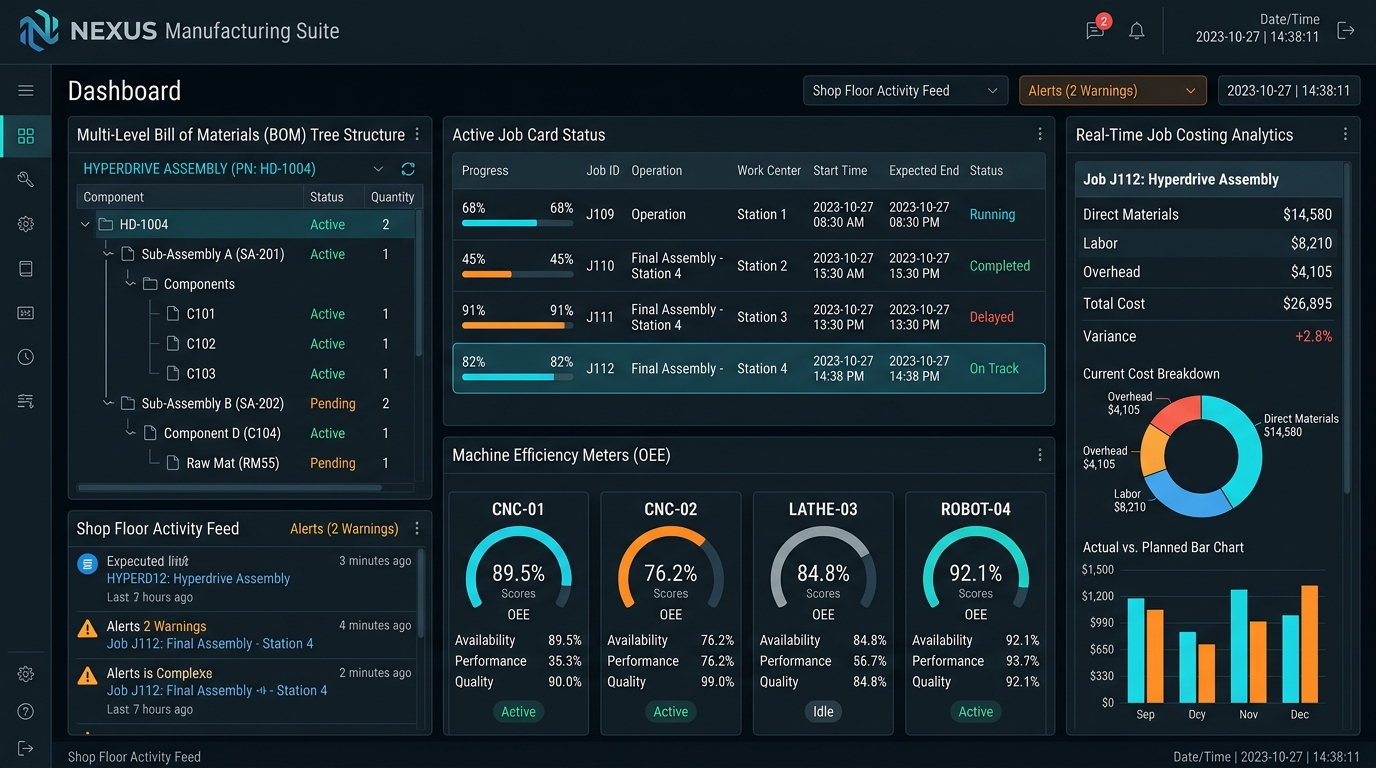
Eliminate shop-floor bottlenecks, control batch costs, and guarantee on-time delivery. ERPPWA unifies multi-level Bills of Materials (BOM), department-wise Job Cards, subcontractor delivery notes, WIP material issues, and actual unit costing.
Hear how ERPPWA unifies multi-level BOMs, Job Cards, department routing, machine scheduling, and actual batch costing.
Audio Summary: This briefing explains how ERPPWA Production Management unifies multi-level Bills of Materials (BOM), department-wise Job Cards, shop-floor SRM issues, subcontractor challans, and real-time manufacturing costing into a closed-loop execution system.
Key Topics Covered:
Manufacturing is a high-stakes balance of materials, machinery, operator hours, and strict delivery dates. Explore how ERPPWA turns daily shop-floor friction into synchronized precision.
A manufacturing plan involves multiple assemblies, raw materials, and processes. ERPPWA begins with a Product Master BOM, then lets you create a dedicated production job containing customized routing details without modifying the original master template.
The Job Dashboard shows live Required, Used, Available, Order/Excess, and Buy quantities alongside process stages. Managers inspect upcoming materials and generate RFQs or Purchase Orders directly for shortages before work stops.
Job process cards show the active workstation, operator, estimated vs. spent hours, priority, and real-time status. Jobs by Department groups shop-floor work into clear department columns; authorized supervisors can put jobs On Hold or reassign tasks in seconds.
ERPPWA records planned material and process costs, then automatically captures actual material issues (SRM), labor hours, machine-hour rates, subcontractor charges, and job vouchers. Compare planned vs. actual manufacturing cost side-by-side.
Record rejected, rework, and scrap quantities explicitly. Dedicated - Rework process stages record extra operator time and material instead of burying costs. When enabled, QC checklist controls prevent closing a job with open defects.
Link external operations through Delivery Note Out (DNO) when parts leave for outside plating or turning, and Delivery Note In (DNI) when they return. Service charges integrate via Service Purchase Invoices to reflect true batch cost.
My Jobs shows each employee their assigned tasks. Start, pause, and continue timer controls capture work time without messy retrospective estimates. Process messages keep dated notes and instructions attached directly to the active operation.
Generate partial Finished Goods (FG In) vouchers as batches come off the line. ERPPWA recalculates manufacturing unit costs and updates inventory immediately, allowing sales dispatches to proceed without waiting for full job completion.
From initial product engineering and BOM scoping to shop-floor issue, subjob assembly, finished goods entry, and cost audit:
Maintain a master BOM with raw material standards and routing templates. When initiating a job, ERPPWA imports configured BOM items and processes. Set target batch quantities, Sales Order cross-references, warehouse, and due dates. Adapt custom BOMs without modifying the master product template.
Manage independently manufactured sub-assemblies as linked subjobs. Complete each subjob, calculate its inspected unit cost, and automatically transfer the finished assembly into the parent job as a staging material. Perfect for machinery, electrical panels, and assembled equipment.
The Job Dashboard process list monitors operations alongside live inventory. Inspect Total Required, In-Stock, and Buy quantities. Generate supplier RFQs or Purchase Orders directly from job BOM shortages to keep procurement synchronized with machine schedules.
Select materials from Pick and generate Shopfloor Requisition Movement (SRM) vouchers to transfer stock to WIP. Operators log in to My Jobs, consult attached drawings, and capture live process hours via the built-in timer.
Validate digital QC checklists with photo evidence and test parameters. Track outside subcontracting with Delivery Note Out (DNO) and In (DNI). If parts require correction, route them through dedicated Rework processes to isolate extra machining costs.
Generate Finished Goods In vouchers for inspected quantities to update inventory immediately. Compare estimated vs. actual manufacturing cost (Materials + Operator Time + Machine Hours + Subcontractor Bills). Post valuation ledgers to Financials without manual reconciliation.
Explore how ERPPWA unifies every facet of custom and serial manufacturing operations under one single pane of glass.
Create and track jobs with customer context, batch size, target delivery dates, and status. Filter job cards by priority and monitor estimated vs. actual costs in real time.
Import Product Master BOMs as a baseline, configure job-specific overrides, and break complex equipment into subjobs with automatic cost roll-up.
Review job-wide shortages and process-specific needs. Trigger RFQs, Purchase Orders, and inspect supplier quotes directly from the job screen.
Organize processes by department, adjust priorities dynamically, and empower operators with the My Jobs start/pause/continue mobile work timer.
Log machine models, availability, maintenance logs, and hourly electricity/operating rates. Select machine IDs and part serial numbers as operations begin.
Enforce mandatory QA inspection checklists, record photo attachments, isolate scrap quantities, and create explicit rework routing stages.
Track parts sent to subcontractors with Delivery Note Out (DNO) and incoming Delivery Note In (DNI), seamlessly capturing outside job work costs.
Post material and labor expenses to general ledgers, compare actual manufacturing unit cost against targets, and create partial Finished Goods in stages.
Attach engineering drawings, spec sheets, and work instructions directly to jobs or operations. Use timestamped process messages for clean shop-floor coordination.
Production teams can manage repeat-product batches and customised manufacturing jobs, track material readiness, allocate department work, monitor rework, and calculate true manufacturing costs. Jump directly to any feature below:
Maintain production jobs as separate manufacturing records. Job setup includes a structured job prefix/number/suffix, job date, due date, customer, relevant Sales Order context, finished product, quantity, source warehouse, category and status. The job editor provides a shortcut to the Finished Goods workspace.
Important: Jobs are not generated automatically from Sales Orders. Exact many-to-many Sales Order document linking is not established by the current screenshots.
<a id="feature-02"></a>
The main Job Dashboard brings together the selected job's identity, status, customer and product, target quantity, due date, cumulative estimated hours, overall progress, process timeline, materials and cost summaries.
It displays navigation to connected operational views: Documents, Checklist, Pick, Purchase Requisition (PR/PRI), RFQ, Purchase Orders, Purchase Order Items, GRN, Goods Received (GR), SRM, SRMI, Incomes, Expenses, DN, DNI and Scrap.
<a id="feature-03"></a>
Define raw-material and component quantities in the Product Master. When the job is created, the configured material requirements are brought into the job and scaled to its manufacturing quantity. The job may then be edited for an actual project.
Important: Optional BOM products are not automatically omitted at job creation; users can adjust the job afterwards.
<a id="feature-04"></a>
Create subjobs for assemblies manufactured before the main finished product. A subjob has its own production operations and completed-product manufacturing cost.
Important: This is sequential cost transfer on consumption of the finished assembly, not a claim that unfinished subjob costs or progress automatically roll up to the parent.
<a id="feature-05"></a>
Configure the actual manufacturing route for a job, with stages such as cutting, assembly, machining, painting, packing or drying. A process can have a name, parent process, planned time, status, instructions, materials, documents, assignee, department and execution resource.
<a id="feature-06"></a>
Manufacturing process setup supports a One Time rate versus a Per Item rate. For example, a one-time setup charge is applied once, whereas a per-item amount is multiplied by the batch quantity. Estimated hours and rate information contribute to process cost calculations.
Important: Do not infer a particular accounting allocation methodology for shared overheads or exact blended costing formulas from the existence of these fields.
<a id="feature-07"></a>
The Job Dashboard shows process stage, estimated duration, spent hours and job-level overall progress. Managers can use process completion and remaining estimated work to assess likely time remaining.
Important: The precise weighting used for the displayed progress percentage is not separately documented; do not advertise a particular formula.
<a id="feature-08"></a>
The Materials grid is designed to show what a production job requires and whether material is available in time for its planned processes. Columns include Total Quantity, Used Quantity, Required Quantity, Order/Excess and Buy.
Important: `Buy` is a job-wide procurement need indicator, not a guarantee of a process-specific purchase schedule. No automatic purchase-date ordering should be claimed.
<a id="feature-09"></a>
The Pick Material screen lists job raw materials with required, used, need, stock, reserve and Order/Excess figures. Users select products and quantities, then choose Issue For Production to create an SRM material-issue voucher.
Important: Do not equate internal SRM material-issue records with external DNO/DNI delivery notes.
<a id="feature-10"></a>
SRM is the job's voucher-level display of production material issues. It includes issue voucher number, date, notes, amount and filters. SRMI is the complementary product-level summary, including product, quantity, average price and amount.
These two views separate voucher tracking from item analysis, reducing clutter on one screen. The main SRM Transactions page manages production issue vouchers outside the individual job view.
Terminology: Some historical screen headings contain subcontract-oriented expansions of the acronyms. Current owner-confirmed behaviour is internal material issue reporting, not a separate subcontract inward transaction.
<a id="feature-11"></a>
Review job-linked Purchase Requisitions (PR) and Purchase Requisition Items (PRI), with a search field, creation action, list filters, requesting employee, requested or committed delivery information, quantity and status.
<a id="feature-12"></a>
Select job BOM products, quantities and relevant supplier(s) to prepare an RFQ. The RFQ dialog allows payment terms, notes, supporting documents and requested-by attribution.
Supplier links and submitted responses are also part of the previously owner-confirmed Purchase Management workflow.
<a id="feature-13"></a>
The Generate PO workflow takes selected BOM lines and required quantities into a supplier-assignment dialog. Users select the supplier, target warehouse, requested-by employee and relevant supporting documents before generating a PO.
<a id="feature-14"></a>
The GRN tab shows job-associated Purchase Invoice/GRN records: PO number, GRN number, supplier, invoice reference, dates and totals. The GR tab shows item-level received goods, including quantity, used quantity, issue quantity, price and PO/GRN references.
Terminology: In ERPPWA, GRN = Purchase Invoice for this goods-inward workflow. `GR` is the detailed goods-received item view, not an extra invoice stage.
<a id="feature-15"></a>
A department-based visual board presents process cards under columns for production departments and unassigned work. Cards show status, assignee and estimated/spent time information.
<a id="feature-16"></a>
My Jobs shows the production tasks assigned to the logged-in employee. Users can open a task, review the material context and use Start, Pause and Continue to record work duration.
Important: Employees cannot simply type arbitrary past-hour values to replace the timer record; this is an actual time-tracking workflow, not unrestricted timesheet entry.
<a id="feature-17"></a>
Maintain machine master information including name, model, availability, operating hours and maintenance. Associate a machine with a manufacturing process and specify machine hourly cost for job costing.
Important: Full serial-number genealogy through every assembly and eventual customer sale is not verified by the latest Production answers.
<a id="feature-18"></a>
External machining can be represented as a named production process with expected duration. Job Dashboard tabs display relevant Delivery Notes (DN/DNO) and Delivery Notes In (DNI), including process, supplier and outward/inward quantities.
Important: A fully automated Outsource-tag orchestration workflow is not confirmed, despite a legacy process field visible in the screenshot. Do not advertise automatic subcontract dispatch from changing a process tag.
<a id="feature-19"></a>
Record scrap, rejected products and rework quantities separately. The Scrap view lists products, quantities, dates, recorded value and actions for adding or exporting scrap records.
<a id="feature-20"></a>
Configure checklist items for a production job, including inspection and testing steps. With permission, employees can mark checklist items complete or pending and add relevant remarks, photographs and documents.
Important: QC is not automatically mandatory for every job; completion enforcement is configurable.
<a id="feature-21"></a>
Attach technical drawings, specifications, photographs and other files to a job or individual process. Upload new files or select documents already stored in the ERP repository.
Important: There is no confirmed automatic document-version history. An updated file is uploaded separately and the previous file can be renamed/tagged manually.
<a id="feature-22"></a>
Workers and managers can exchange messages against production processes. Task messages record author and date/time and are available from the process card.
Important: The channel of the notification is not established as email or WhatsApp.
<a id="feature-23"></a>
The Job Incomes and Job Expenses views provide date-filterable records of job-specific transactions including description/classification, party, amount, tax and total. Users can add and edit entries.
Important: The Job Dashboard is an estimated-versus-actual manufacturing-cost screen, not a per-job sales profit calculation. Profit is available in sales reporting after the product has been sold.
<a id="feature-24"></a>
The job editor provides navigation to Finished Goods. Partial Finished Goods vouchers can be generated for completed quantities even while the job remains in progress.
Important: Per-batch exact cost-allocation method and retroactive repricing of previously completed batches were not specified.
<a id="feature-25"></a>
ERPPWA links Production with neighbouring modules:
---
## Which production activity uses which ERPPWA screen?
| Activity | Screen / voucher | What the user does |
|---|---|---|
| Start manufacturing a batch | Job / Edit Job | Create the job separately, set quantity and manufacturing details |
| Check upcoming process materials | Job Dashboard β Process + Materials | Review upcoming process, job-wide Buy quantities and shortages |
| Source raw materials | Job Materials β Generate RFQ / PO | Select products, quantities and suppliers for purchasing |
| Issue raw material to production | Job Dashboard β Pick / SRM | Generate the issue voucher for selected quantities |
| Review material issue lines | Job Dashboard β SRMI | See issued products, quantities, average prices and values |
| Review purchased goods | Job Dashboard β GRN / GR | View job-linked Purchase Invoice vouchers and received item lines |
| Track employee work time | My Jobs | Start, pause and continue the assigned-process timer |
| Record outside machining movements | Job Dashboard β DNO / DNI | Review outward and returning material documents |
| Check quality or rework | Checklist / GR / Process | Track QC status, rework issue and added rework work |
| Record finished output | Finished Goods voucher | Bring completed quantities into stock and update product pricing |
## Frequently Asked Questions
---
## Start using ERPPWA Production Management
Explore how your manufacturing teams can manage jobs, components, shop-floor processes, quality, supplier work, job expenses and finished goods through a connected cloud ERP.
Primary CTA: Start Your Free 20-Day Trial Secondary CTA: Explore Production Management Problems & Solutions
Eliminate shop-floor delays and unaccounted scrap. ERPPWA links customer sales orders, multi-level BOM explosion, shortage auto-POs, material issues, outside job work, and finished goods inward into one synchronized pipeline.
Convert confirmed customer POs into Production Jobs. Explode multi-level Bills of Materials (BOM), sub-assembly requirements, and process routing templates.
Compare BOM raw material needs against current free warehouse balances. Auto-generate Job-Wise Purchase Orders with scheduled deliveries for long-term jobs.
Issue raw materials to production in 1 click, moving them into Work-in-Progress (WIP). Record raw material heat codes and serial numbers inside master products.
Issue printable and digital Job Cards to lathe, milling, fabrication, and assembly floors. Track operator hours, machine runtimes, and completed quantities live.
Dispatch items for heat treatment or coating with contractor Delivery Notes. Inspect returned goods via standardized QC Templates and log rework/scrap.
Transfer inspected goods into warehouse inventory. Calculate actual unit cost: Used Materials + Process Expenses + Direct Labor for true gross profit visibility.
Explore how ERPPWA eliminates production delays, automates material staging, and enforces actual batch costing.
Complex manufactured assemblies consist of dozens of sub-assemblies, raw metals, hardware fasteners, and outside heat treatments. Managing BOMs on spreadsheets leads to missing components, unexpected shop-floor stoppages, and inaccurate pre-order cost estimations.
Formulate nested, multi-level Bills of Materials (BOM) with complete operational process routing. Define raw materials, sub-assemblies, scrap percentages, and process sequences (Cutting → Machining → Heat Treatment → Assembly). Print comprehensive Job BOMs with drawings and routing notes in 1 click.
Standardize manufacturing blueprints and ensure 100% component availability before production starts.
Schedule Guided Demo →| Component / Part | Qty Required | Scrap % | Stage / Process |
|---|---|---|---|
| SS316 Seamless Tube | 1.25 Meters | 2.5% | CNC Turning • M-01 |
| Piston Rod (En8D Hardened) | 1.00 Pcs | 0.0% | Hard Chrome • Outside |
| Hydraulic Seal Kit (Viton) | 1.00 Set | 0.0% | Final Assembly Line |
When a customer calls asking about their order status, factory supervisors run across machining, grinding, and fabrication shops with clipboards asking: "Where is this job right now?" Paper job cards get soiled, lost, or back-dated by operators.
Gain live real-time visibility across all shop-floor stages with Job Tracking by Department. ERPPWA issues digital Job Cards per employee and process. Operators scan job cards, log machine runtime hours, and record completed parts, updating management dashboards instantaneously.
Answer customer dispatch inquiries in 5 seconds without leaving your desk.
Schedule Guided Demo →| Job No / Product | Current Department | Assigned Operator | Stage Progress |
|---|---|---|---|
| JOB-2026-088 Hydraulic Cylinder 80mm |
CNC Machining • Bay 2 | Rajesh K. (Lathe 04) | 75% • IN-PROGRESS |
| JOB-2026-092 SS316 Flanges (250 Pcs) |
Outside Contractor | Apex Hard Chrome | DELIVERY NOTE #42 |
| JOB-2026-094 Shaft Coupling Sets |
Quality Control (PDI) | Vikas M. (QC Lead) | 95% • FINAL INSPECT |
Production begins on a high-value order, only for the assembly line to grind to an emergency halt on Day 4 because a specific bronze bushing or O-ring was out of stock. Purchasing buys at 30% premium market rates, eroding job margins.
Never suffer material shortages during production. When a job is released, ERPPWA calculates the 'Required to Purchase Stock List' comparing BOM needs against unreserved warehouse stock. Generate Job-Wise Purchase Orders in 1 click and schedule phased deliveries for long-term production contracts.
Ensure 100% material staging before releasing jobs to the shop floor.
Schedule Guided Demo →| Raw Material / Part | Job Need | Free Stock | Shortage & Action |
|---|---|---|---|
| SS316 Seamless Tube | 120 Meters | 150 Meters | β IN-STOCK (RESERVED) |
| En8D Piston Rod 40mm | 80 Meters | 20 Meters | β‘ 1-Click PO: 60 Mtr |
| Viton Hydraulic Seals | 100 Sets | 40 Sets | β‘ 1-Click PO: 60 Sets |
When raw materials leave warehouse shelves, storekeepers deduct inventory on paper slips without recording which serial numbers or heat batches went into which finished machines. During ISO or customer quality audits, proving component origins takes weeks of manual digging.
Enforce 100% material accountability with digital Material Issue slips. ERPPWA deducts store stock and transfers inventory directly into shop-floor Work-in-Progress (WIP). Record raw material serial numbers and supplier heat codes embedded inside each master product for instant backward trace.
Pass rigorous customer quality audits with push-button component genealogy.
Schedule Guided Demo →| Material Issued | Heat / Batch No | Quantity | Master Product Serial |
|---|---|---|---|
| SS316 Forged Cylinder Body | HEAT-8812-JINDAL | 25 Pcs | SN-HYD-2026-001 to 025 |
| Hardened Piston Rods | BATCH-CHROME-412 | 25 Pcs | TAGGED TO ASSEMBLY |
| High-Pressure Seals | LOT-VT-9902 | 25 Sets | β QC VERIFIED |
Sending semi-finished goods for outside electroplating, galvanizing, or precision grinding creates huge inventory blindspots. Dispatched quantities don't match returned items, scrap is undocumented, and contractor labor bills are paid without physical verification.
Master outside job work with process-wise Delivery Notes. Generate official subcontracting gate-passes specifying operations (e.g. Chrome Plating). Track goods sent, goods received back, process shrinkage percentages, and approve contractor labor billing automatically against received quantities.
Eliminate vendor inventory leaks and verify contractor invoices with zero disputes.
Schedule Guided Demo →| Delivery Note / Vendor | Outside Process | Qty Sent → Recd | Scrap / Status |
|---|---|---|---|
| DN-CONT-2026-081 Apex Hard Chrome Ltd |
Hard Chrome Plating (50 Micron) | 80 Pcs → 80 Pcs | β QC PASSED (100%) |
| DN-CONT-2026-082 Shree Ganesh Heat Treat |
Induction Hardening HRC 58 | 200 Pcs → 196 Pcs | 4 Pcs Scrap (2% Norm) |
| DN-CONT-2026-083 Pooja Grinding Works |
Centerless Cylindrical Grind | 150 Pcs → Pending | AT CONTRACTOR (DUE 2D) |
Manufacturers quote prices based on standard BOM estimates, but real production incurs machine electricity spikes, operator overtime, tool wear, and scrap rejections. Factory owners only discover months later that high-volume jobs actually lost money.
Calculate true landed production costs with mathematical precision. ERPPWA applies the exact formula: Used Materials + Process Expenses + Direct Labor = Actual Production Cost. Gain live variance reports comparing standard estimates to actual batch cost, protecting net profitability.
Price your products with scientific confidence and eliminate hidden factory margin erosion.
Schedule Guided Demo →| Cost Element | BOM Estimate | Actual Incurred | Variance & Impact |
|---|---|---|---|
| Raw Materials (Alloy Steel) | βΉ 1,68,000 | βΉ 1,72,500 | +2.6% (Metal Spike) |
| Direct Machinist Labor | βΉ 52,000 | βΉ 48,200 | -7.3% (Ahead of Sched) |
| Chrome Plating & Power | βΉ 25,000 | βΉ 26,400 | +5.6% (Freight) |
Quality checks performed verbally without standardized inspection templates result in defective goods slipping through to clients. Reworked parts incur unrecorded operator labor, and scrap metals are sold for cash without accounting entries or recovery tracking.
Institutionalize zero-defect manufacturing discipline. ERPPWA provides standardized QC Templates for inward receiving, in-process stages, and final pre-dispatch inspection (PDI). Track job-wise rework cycles with separate labor tracking, and record scrap generation alongside scrap sales income.
Protect your brand reputation and recover hidden profits from systematic scrap control.
Schedule Guided Demo →| Inspection Parameter | Spec Tolerance | Observed Value | QC Result |
|---|---|---|---|
| Bore Diameter (ID) | 80.00 ± 0.02 mm | 80.012 mm | β WITHIN TOLERANCE |
| Chrome Layer Thickness | Min 35 μm | 42 μm | β PASSED |
| Hydrostatic Pressure Test | 250 Bar (15 Mins) | 252 Bar • 0 Leak | CERTIFIED 3.1 |
Machine breakdowns, tooling bottlenecks, and unmonitored stage delays cause promised customer delivery dates to breach. Factory owners and sales reps only find out a shipment is late on the promised dispatch day itself, damaging buyer trust and triggering penalties.
Eliminate surprise delays with predictive shop-floor intelligence. ERPPWA includes Machine Management and three proactive tracking reports: Job Intime Report, Job Possible Delay Report, and Job Delay Report. Identify bottlenecks 3 to 5 days in advance and reallocate machine loads proactively.
Achieve 98%+ on-time delivery rates and delight high-value enterprise buyers.
Schedule Guided Demo →| Job No / Customer | Promised Date | Current Stage | Predictive Risk Status |
|---|---|---|---|
| JOB-2026-088 Bharat Heavy Machineries |
12-Oct-2026 | Assembly Line 01 | β INTIME (1.5d Ahead) |
| JOB-2026-092 Shreeji Auto Components |
14-Oct-2026 | Outside Chrome Plating | β οΈ POSSIBLE DELAY (12h Risk) |
| JOB-2026-095 Apex Tooling Solutions |
08-Oct-2026 | Finished Goods Store | β COMPLETED • INWARDED |
A material shortage affects purchasing; a delayed process affects delivery; rejected parts distort profit. Filter by operational area to explore how ERPPWA solves each manufacturing bottleneck:
A customer order does not necessarily contain the warehouse, detailed processes, material changes and production instructions needed on the factory floor.
Create a separate Production Job with product, quantity, customer context, due date, warehouse, status and editable production details.
Multiple orders for the same fixed product can lead to needless planning of small manufacturing batches.
Plan one production job for a combined standard-product batch, such as 100 + 200 + 300 units, while keeping job creation separate from Sales Orders.
A custom machine may use different components from the Product Master BOM, but a one-time job should not permanently change the standard build.
Bring configured BOM items into the job, then edit the job-specific component list without modifying the Product Master definition.
A standard process route may not match an engineered order or a one-off project.
Copy the configured manufacturing processes into a job and edit operation details, assignees, hours, instructions and materials within that job only.
Assemblies built for a machine may require their own jobs and costs before final assembly.
Create assembly subjobs, complete them and use their finished productsβat their manufacturing costβas materials in the parent job.
A one-time setup charge should not multiply with output, while a per-unit processing charge should.
Configure each operation as One Time or Per Item, with relevant process quantities, hours and cost settings.
Drying, curing or similar waiting time affects when a product will be ready even if a worker is not actively machining it.
Add a dedicated process with its expected duration, such as a 20-hour drying step, to the job route.
A job may have hundreds of components, and managers need to inspect upcoming steps without searching a full BOM manually.
Open ongoing or upcoming processes and review their associated materials alongside the job-wide Materials grid.
Teams can know how much a job needs but not how much remains to buy.
Use Total Qty, Used Qty, Required Qty, Order/Excess and Buy to review shortages at the job level.
Stores and Production may request materials without a clear requisition reference or status.
Create and review job-linked Purchase Requisitions and PR line items with requester, quantities, dates and statuses.
Purchasing teams lose time transferring component lists, quantities, specifications and supplier selections manually.
Select job BOM products and quantities, choose supplier(s), payment terms, notes and documents, then generate RFQs.
Price and delivery terms for one component may come from several suppliers.
Open linked RFQ Responses and compare supplier rates, total amounts, delivery days, notes and documents before selecting a deal.
A job has an accurate requirement list, yet purchasing staff may manually recreate it on supplier orders.
Select the required BOM items and initiate supplier-specific Purchase Orders with supplier, warehouse, employee and document details.
Production plans can be affected by missing supplier deliveries, but procurement status may be stored in a separate department.
Review the job-linked PO list and the item-level POI view with supplier, order dates, quantities, tax and status.
When multiple invoices arrive from different suppliers, users need to know which materials have been received for which job.
Review multiple job-linked GRN/Purchase Invoice records and the GR item-line view with received and used quantities.
Separate spreadsheets for jobs, material issues, invoices and processes make it difficult to understand one manufacturing batch.
Use the Job Dashboard to open processes, materials, estimated/actual cost, PR, RFQ, PO, GRN, issue records, expenses and scrap in context.
Work for cutting, assembly, painting or testing may be assigned to different departments with unclear priority.
Use Jobs by Department to view process cards grouped by department, status, assignee and estimated/spent time.
Factory priorities change when a critical customer job, material delay or machine problem arises.
With permission, managers can change a process priority or mark it On Hold.
Employees, machines or department availability can change during a job.
Authorised managers can reassign a process to a different department or employee even after it has started.
A factory employee needs a focused worklist rather than the full factory production queue.
My Jobs displays tasks assigned to the logged-in employee, with relevant job status and material context.
Staff may estimate hours after completing the work, making job cost and duration less reliable.
Use a Start, Pause and Continue timer in My Jobs to record elapsed work time instead of unrestricted manual typing.
Manufacturers need to know which machine performed a process and what its operating time costs.
Maintain machine details, select the machine when starting work and include the configured machine-hour rate in manufacturing cost.
A technician machining a numbered component should be able to identify the relevant part in the process record.
At process start, employees can select the machine and serial number of the part being worked on.
Raw materials can be consumed without clear reference to the production job and its remaining requirements.
Use Pick to select job material lines and generate SRM material-issue vouchers; issue amounts in stages when required.
A long material-issue history is difficult to read when document and product details appear in one table.
Use SRM for issue voucher numbers/dates/amounts and SRMI for product quantities, average prices and totals.
External suppliers may hold components while the manufacturing job is still active.
Track outgoing materials through DNO and their return through DNI; view associated records and quantities from the job.
A supplierβs machining invoice or manual service expense can be omitted from the cost of the manufactured product.
Record the service charge through SPI, PI or the job Expenses section; the supported entries contribute to manufacturing cost.
A standard checklist may not cover the inspection needs of customised machines or individual batches.
Create job-specific quality checklist items with relevant notes, photos and documents.
Closing a manufacturing job prematurely can hide unfinished inspection work.
Enable the configurable QC completion restriction to prevent job completion while checklist items remain pending.
A failed component may be recoverable through extra processing or may require a replacement item.
Record Rejected, Rework and Scrap quantities separately and issue additional material when unusable components must be replaced.
Unexpected rework makes the job costlier than estimated, but teams may not record its cause and effort.
Create a new process named after the original with ` - Rework`, record work details and include additional expense in manufacturing cost.
Waste can accumulate without a clear job-specific register.
Use the job Scrap list to record products, quantities, date and value; add and export scrap entries where supported.
Scrap may be sold, but the income needs to be visible separately from manufacturing costs.
Enter scrap-sale proceeds in Job Incomes so the income remains tied to the relevant manufacturing job.
Production managers need to understand whether actual resources and expenses are exceeding the planned job.
The Job Dashboard shows estimated and actual manufacturing costs with supporting material, process and expense details.
Small but relevant job expenses can be forgotten in a productβs manufacturing cost.
Add expenses directly in Job Expenses; they contribute to actual job manufacturing cost and post to Finance expense ledgers.
Revenue from scrap sales or other job income is not the same as profit on a finished machine.
Display Job Incomes and Expenses separately, compare estimated/actual manufacturing cost, and assess product profit in Sales reporting after sale.
A batch of 100 machines may produce 40 usable units before the remaining 60 are ready.
Create partial Finished Goods vouchers during an open job; every partial voucher calculates manufacturing cost and updates Product Page pricing.
A standard production job may be continued for another batch, so automatic permanent closure could interrupt work.
Manage job status manually, subject to any enabled QC completion requirement, rather than automatically closing the job at the last Finished Goods voucher.
Operators often need specifications associated with an exact job or process, not a general file folder.
Attach new or existing ERP documents to jobs and individual processes and use process instructions in the job workspace.
When engineering revises a drawing, workers need a practical way to distinguish it from the earlier attachment.
Upload the new document and rename/tag the previous copy manually to clarify which version should be used.
A shop-floor correction or instruction may be difficult to trace back to the operation it concerned.
Use process-level Task Messages with author/date history; a new message triggers a notification and can be read inside the job.
Every manufacturing enterprise has distinct routing hierarchies, Job Card print layouts, and machine overhead formulas. With ERPPWA, our software adapts to your proven shop-floor operationsβnot the other way around. Our ERP is fully customized to fit your manufacturing operations.
Enjoy complete architectural sovereignty. Host ERPPWA on our managed encrypted cloud for effortless multi-plant access, or deploy it 100% On-Premise on your local factory server for total data privacy and zero internet downtime dependency on your shop floor.
Compare how our modern Progressive Web App architecture eliminates the rigid complexity, exorbitant AMC costs, and missing shop-floor mobile tools of old legacy software.
| Manufacturing Capability | ERPPWA Intelligent Platform | Traditional Legacy Other ERPs |
|---|---|---|
| Multi-Level BOM & Process Routing | β Nested multi-level BOMs with scrap % & 1-click printable process sheets | β Rigid single-level BOMs or complex engineering add-on modules |
| Digital Job Cards & Department Tracking | β Live Department Job Tracker with operator work hours & mobile scan | β Paper clipboards and retroactive manual data entry |
| Job-Wise Shortage Calculation & Auto-PO | β Automated 'Required to Purchase Stock List' with 1-click PO generation | β Disconnected purchasing; frequent line-stopping material shortages |
| Serial Component Genealogy | β Embedded raw material serial and heat codes traced in master product | β Incomplete traceability; cannot isolate defective vendor batches |
| Subcontractor Delivery Notes & Scrap | β Process-wise outside delivery notes, shrinkage norms & labor billing | β Manual delivery challans with high unrecorded contractor scrap |
| Actual Landed Unit Costing | β Scientific formula: Used Materials + Process Expenses + Direct Labor | β Standard cost estimates only; hidden overhead costs eat profits |
| Quality Inspection & Rework Management | β Standardized QC Templates (Inward, Stage, PDI) & job rework tracking | β Verbal QC; reworked operator labor buried in general overhead |
| Predictive Delay Intelligence | β Job Intime, Possible Delay, and Delay reports alert days before deadline | β Reactive firefighting; delays discovered on promised delivery date |
| Scrap & Scrap Income Accounting | β Dedicated scrap weight logs & scrap sales revenue credited to job ledger | β Scraps quietly disposed off without formal ledger accounting |
| Accounting Ledger Synchronization | β 2-Way automated sync for production vouchers, stock journals & bills | β Clumsy manual XML export/import or complete disconnect |
| ERP Customization | β Fully customized Job Cards, routing sheets, and reports | β Rigid templates or expensive change requests |
| Deployment Flexibility | β Pure Cloud SaaS or 100% Private On-Premise Factory Server | β Rigid client-server desktop installs tethered to office LAN |

Find answers to common operational questions about Bills of Materials, Job Cards, subcontractor job work, actual costing, and ERPPWA implementation.
Yes. ERPPWA supports nested, multi-level Bills of Materials (BOM) for complex assemblies, sub-assemblies, semi-finished components, and raw materials. It accounts for component scrap percentages, operational process sequences, and pre-production unit cost estimations.
ERPPWA generates digital and printable Job Cards per employee, department, and process. Supervisors can monitor the live Job Tracking by Department dashboard to see which work orders are at cutting, machining, heat treatment, or final assembly with real-time percentage completion.
Yes. When a Job is scheduled, ERPPWA generates a 'Required to Purchase Stock List' comparing BOM requirements against current free store stock. It calculates the exact shortfall and creates Job-Wise Purchase Orders with pre-scheduled delivery dates in 1 click.
ERPPWA calculates actual cost using a true mathematical formula: Used Materials Cost + Direct Machine & Process Expenses + Operator Labor Hours = Actual Production Cost. It provides live variance analysis comparing standard BOM estimates to actual cost.
Yes. ERPPWA records the specific raw material heat codes, batch numbers, and component serial numbers used in each master finished product, ensuring full cradle-to-grave traceability for warranty audits.
ERPPWA manages outside processes with dedicated contractor Delivery Notes. It tracks sent materials, returned finished components, allowable process shrinkage, and contractor service billing with automatic reconciliation.
Yes. ERPPWA provides standardized QC Templates for inward raw materials, in-process stage inspection, and pre-dispatch final inspection (PDI). Rejected items can be routed into dedicated Rework Jobs or scrapped.
ERPPWA includes three predictive delay analytics reports: Job Intime Report, Job Possible Delay Report, and Job Delay Report. Supervisors receive automated alerts before milestone delivery dates breach, allowing proactive machine load rebalancing.
Yes. ERPPWA records generated scrap by job and logs scrap sales revenue directly against job ledger accounts, giving owners an accurate picture of net manufacturing yields and scrap recovery.
Yes. ERPPWA generates printable Job BOM documents detailing raw materials, component drawing references, cutting sizes, and process steps for shop floor operators.
Upon final QC clearance, ERPPWA performs a 1-click Finished Goods Inward entry, closing the Job, updating warehouse stock, assigning serial/batch barcodes, and posting final manufacturing journal entries.
Yes. Manufacturing vouchers, raw material consumption journals, finished goods inward vouchers, and contractor job work bills synchronize seamlessly with standard external accounting platforms and financial ledgers.
Experience how ERPPWA eliminates shop-floor delays, automates Job Cards, and calculates true actual unit cost.